QuickBooks is where finance teams check invoices, receivables, profit, and cash position, but most people only need answers, not another dashboard. Connecting QuickBooks to Cody turns that accounting system into a Slack-native finance assistant that can answer invoice-status questions, surface overdue balances, and summarise what changed without exposing the full QuickBooks UI to everyone.
How OpenClaw Integrations Work
OpenClaw is a self-hosted AI assistant that runs on your own server — typically an EC2 instance — and connects to Slack. It uses Claude under the hood to process requests. Out of the box, OpenClaw doesn't ship with pre-built connections to third-party tools. Instead, integrations are built using the skills system: markdown files in ~/.openclaw/skills/ that give Claude instructions for a particular domain, combined with HTTP tool calls to any API you expose to it.
In practice, adding a real integration means: getting API credentials from the third-party service, building or configuring a small proxy/endpoint that OpenClaw can call, and writing a skill file that tells Claude how to use it. For some tools this is an afternoon of work. For others — like QuickBooks — it's considerably more involved.
Connecting OpenClaw with QuickBooks: Step by Step
Step 1: Create a QuickBooks App and Complete OAuth
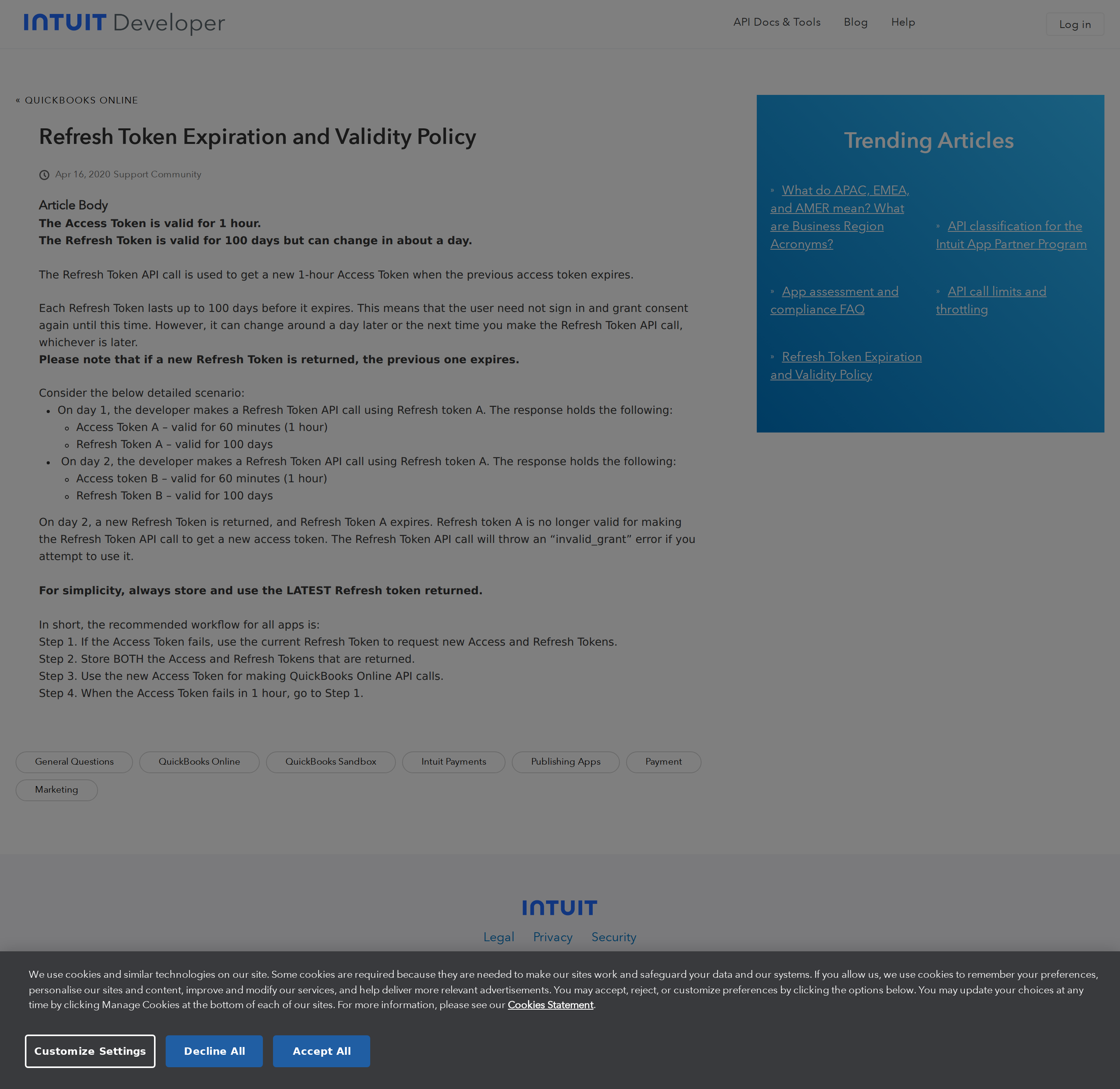
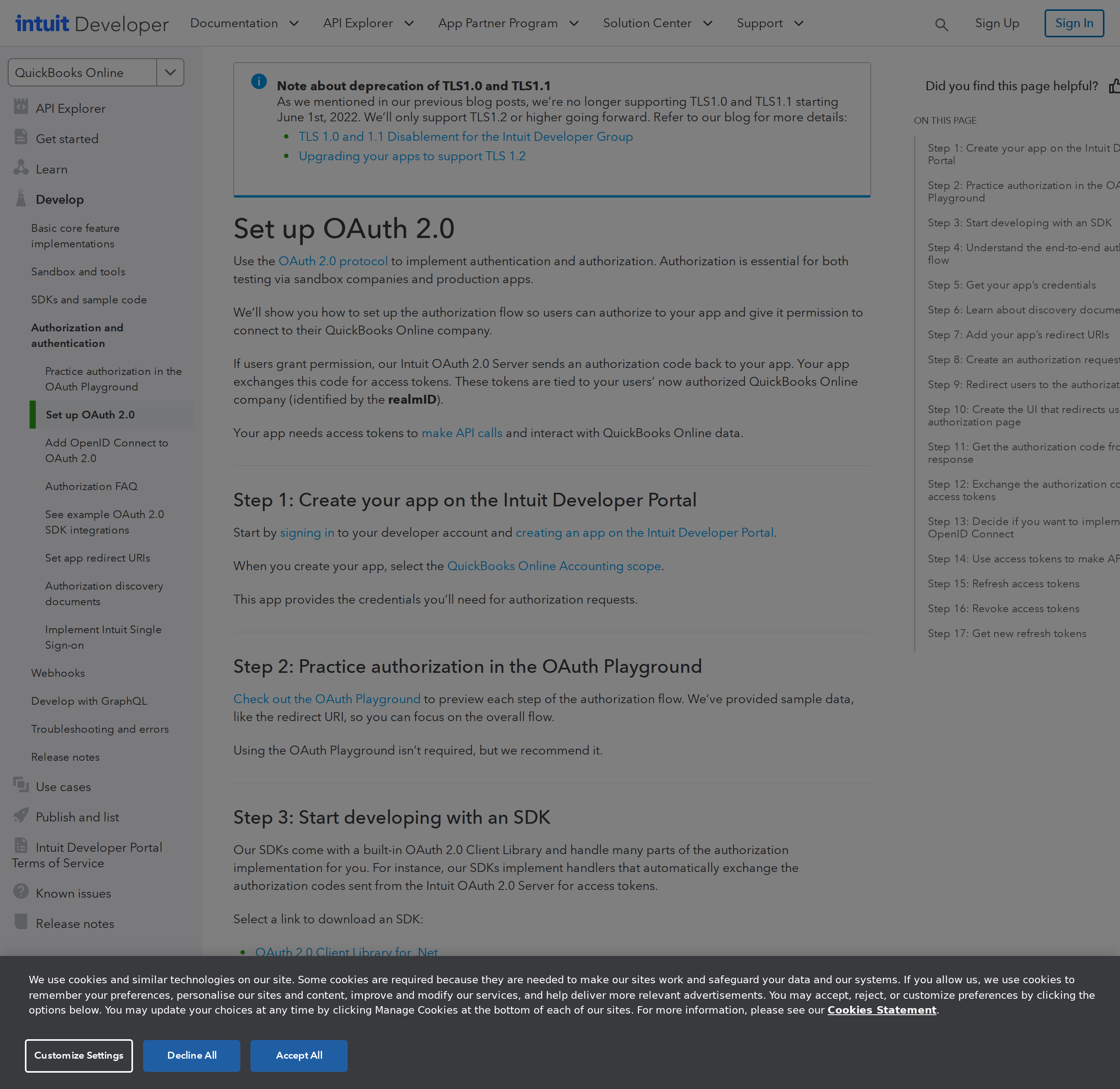
Go to developer.intuit.com and create a new app. Select QuickBooks Online as the platform. Complete the OAuth 2.0 flow to connect your company's QuickBooks account — you'll need the Accounting scope (com.intuit.quickbooks.accounting). Store the access token and refresh token; access tokens expire after 1 hour and refresh tokens expire after 100 days.
Step 2: Use the QuickBooks Accounting API
The QuickBooks Accounting API base URL is https://quickbooks.api.intuit.com/v3/company/{companyId}/. Key endpoints: /reports/ProfitAndLoss (P&L report), /reports/CashFlow, /query?query=SELECT... (SQL-like queries for invoices, customers, vendors), /invoice/{id} (specific invoice detail).
Step 3: Build the Proxy and Skill File
Build your proxy around financial report and invoice query endpoints. Write ~/.openclaw/skills/quickbooks.md with the report types available, how to handle date ranges, and what financial metrics your team commonly asks about. QuickBooks' SQL-like query language is powerful — document useful query patterns.
Challenges and Caveats
Financial Data Requires Strict Access Controls
Giving OpenClaw access to financial data is a significant trust decision. Ensure your proxy's API key is tightly scoped (read-only accounting), access to the skill is limited to authorised team members, and audit logging is in place for all financial queries.
Sandbox vs Production Environments
Intuit provides a sandbox environment with test data for development. Make very sure your production integration is pointed at the live company ID — a common mistake is mixing up sandbox and production credentials.
QuickBooks Is Not a Tool You Can Just Bolt MCP Onto
The three steps above — create an app, call the Accounting API, write a skill file — are the honest path, and for a self-hosted OpenClaw they are still the right backbone. But before you wire anything, you need to know what you are actually connecting to, because QuickBooks is the one integration on this site where the OAuth setup itself is the hard part, not the API.
Three structural facts shape everything below:
- Every token is bound to one
realmId(a company file), not to your app. A QuickBooks app can be installed by hundreds of companies; each install produces its own access/refresh token pair scoped to that one realm. There is no "all my clients" token. If your team runs more than one QuickBooks company file, you need one connected realm per company, and a proxy that refuses to guess which one a question is about. - QuickBooks has no hosted, first-party MCP endpoint. There is no
mcp.quickbooks.comthe way there is anmcp.stripe.comormcp.hubspot.com. Anything marketed as "QuickBooks MCP" in 2026 is a community server wrapping the same REST API you would call yourself — so the deciding question is not "MCP or not" but "do I want a third party holding a token that can read my ledger." - The API is a SQL-shaped query interface, not a REST collection browser. You do not GET a paginated list of invoices. You POST (or GET) a
SELECTstatement to/v3/company/{realmId}/query. That is genuinely nice for an LLM — it maps well to natural-language questions — and it is also where most integrations quietly break.
Path A: The Accounting API proxy + skill file (the headless path)
This is what the base template above describes, and it is the only path that works unattended. OpenClaw is headless, so the OAuth consent screen cannot be re-run at 3 AM when a token dies — which means the refresh job is the integration.
Build a small proxy that owns the following:
| Responsibility | Why it must live in the proxy, not the skill file |
|---|---|
| Token storage + refresh | Access tokens last 1 hour. Refresh must happen server-side, on a schedule, with the rotated refresh token persisted atomically. |
| Realm selection | Every call needs a realmId. Hardcode one per deployment or require it explicitly; never infer it. |
| Query allow-listing | The /query endpoint accepts arbitrary SELECT. Read-only proxying means allow-listing entities, not verbs. |
| Report shaping | /reports/ProfitAndLoss returns deeply nested rows; flatten them before they reach the model. |
A minimal proxy surface worth exposing to the skill file:
GET /reports/ProfitAndLoss?start_date=…&end_date=…&accounting_method=AccrualGET /reports/CashFlow,GET /reports/BalanceSheetGET /query?query=SELECT * FROM Invoice WHERE Balance > '0'GET /invoice/{id},GET /customer/{id}
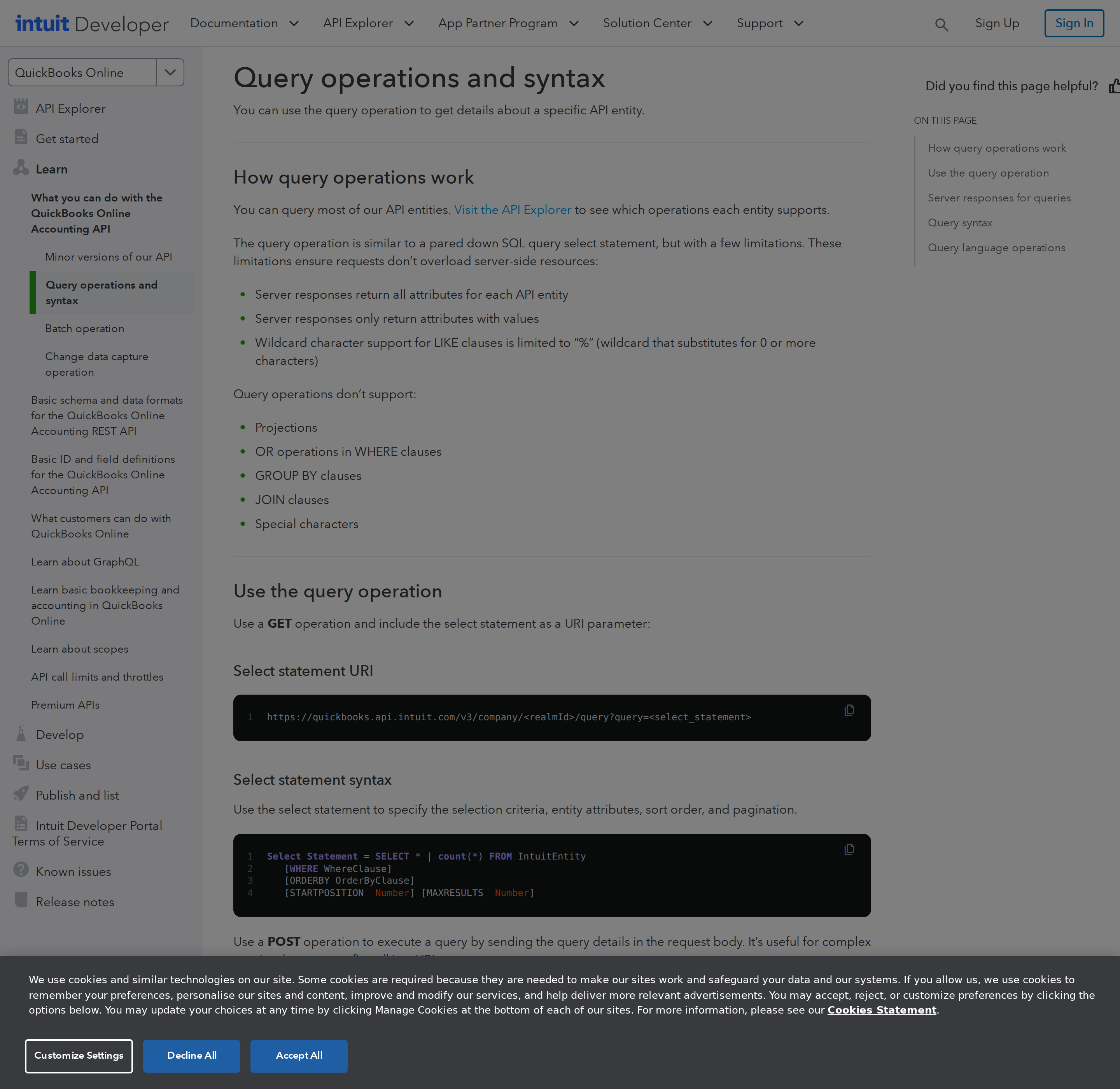
The /query endpoint is the documented entry point for most read work. Note that it is not full SQL: no JOINs, no subqueries, no LIKE on every field.
Then write ~/.openclaw/skills/quickbooks.md documenting which realm the proxy is pointed at, the exact report names available, and the handful of query shapes your team actually asks for. An assistant that knows "we always ask for overdue receivables as SELECT * FROM Invoice WHERE Balance > '0'" is worth ten times one that has to invent a query each time.
Path B: Community MCP servers (only with eyes open)
If you want MCP rather than a hand-rolled proxy, the ecosystem is community-built and thin. The trade you are making is convenience versus token custody: any server you install holds a refresh token that can read your entire general ledger, and even the read-only Accounting scope is broad.
Two practical rules if you go this way:
- Prefer self-hosted stdio over any hosted connector. A tool you run on your own box at least keeps the token where your other credentials live.
- Assume the tool list is a read surface until proven otherwise. Audit which entities the server exposes before pointing an agent at it; a "reporting" server that also registers
updatetools is a write credential you did not intend to grant.
What an OpenClaw + QuickBooks assistant is actually good at
These are the five patterns that earn their keep, with the prompts that drive them. Notice that most of them are read + summarise jobs — which is exactly the profile you want for a system of record you should not let an LLM mutate.
1. Monday morning receivables digest (scheduled, headless).
"Pull every open invoice with a balance over the overdue threshold, group by customer, and post the top 10 by amount to #finance with each customer's oldest due date and total exposure. Flag anything older than 60 days."
2. "Where is this invoice?" from Slack (interactive).
"Customer Acme says they paid invoice 4471 last week. Check the invoice in QuickBooks and tell me the current balance, the payment status, and the date of the last payment applied." The assistant returns a structured answer with the actual field values, not a link back into the dashboard.
3. Month-end close sanity check (scheduled).
"Compare this month's P&L revenue and expense totals against last month's, highlight any account that moved by more than 25%, and list any uncategorised expenses in the period."
4. Cash position without opening the dashboard.
"What is our cash position across all bank accounts right now, and what is the 30-day receivable total that feeds it?"
5. Cross-tool finance brief.
"Combine this week's Stripe payouts with the QuickBooks P&L for the same week and tell me whether the difference matches what we have booked but not yet collected." This is where an assistant beats a dashboard: the answer does not live in either tool.
Seven QuickBooks-specific pitfalls
These are the failure modes that actually cost time, in rough order of how often they bite.
1. Refresh-token policy changed — the "100 days" advice is now wrong. For years the rule was "refresh every 100 days or the connection dies." Intuit has since moved to a maximum refresh-token validity of five years, with the token rotated on each refresh and a new expiry field returned in the refresh response. Practically, this means: your refresh job should still run well inside the hour, but your reconnection planning changes — the customer reauthorises when the refresh token's own expiry approaches, and Intuit now surfaces a Reconnect URL (mandatory in app settings) plus in-product and email reminders to the customer at 30 days and 7 days. If your skill file says "tokens last 100 days," update it.
2. Sandbox and production are different hosts and different company IDs.
Development happens against a sandbox company with sample data; production calls go to quickbooks.api.intuit.com against a real realmId. Mixing them is the classic "it worked in testing" bug, and the symptom is confusing: a production token used against a sandbox realm returns an authorisation error that reads like a permissions problem, not a host problem. Pin both the base URL and the realm ID in configuration and log which pair was used on every call.
3. minorversion is not optional in practice.
QuickBooks versions its API by a minorversion query parameter attached to every request. Omit it and you get the oldest supported behaviour, which silently differs from the docs you are reading. Pin an explicit minorversion in the proxy and bump it deliberately.
4. The query language is SQL-shaped but not SQL.
No JOINs, no subqueries, and paging is done with STARTPOSITION and MAXRESULTS rather than a cursor. An LLM that has seen a lot of SQL will confidently emit a query the endpoint rejects. Put the allowed entity list and three or four working query templates directly in the skill file so the model copies rather than invents.
5. Tokens are per-realm, and a multi-entity setup breaks naive proxies. If a question could concern more than one company file, the proxy must demand an explicit realm rather than defaulting. A silent default is how you end up reporting one entity's receivables as if they were the group's.
6. Financial data is the highest-stakes thing you will ever expose.
The Accounting scope grants read access to the full ledger, customers, vendors and payments. Treat the proxy as a privileged system: read-only scope, no POST/DELETE pass-through, per-user access control on the skill, and an audit log of every query with the requesting Slack user attached. Do not give the agent write access to a system of record.
7. Reports are nested; models truncate them.
/reports/ProfitAndLoss returns a tree of row objects with subtotals at multiple levels. Passed raw, it eats context and the model summarises the wrong level. Flatten to the two or three levels you actually report on before it reaches the assistant.
The honest recommendation
For a headless OpenClaw on an EC2 box, the API proxy + skill file path is the right one, and it is not close: it is the only path that survives token expiry without a human, it keeps the ledger credential on your own infrastructure, and the /query endpoint's SQL shape is unusually friendly to an LLM. Reserve MCP servers for interactive experimentation, and only the ones you self-host.
If you want the same read-only finance assistant without building or babysitting the OAuth machinery, Cody gives you a QuickBooks assistant in Slack with the connection and access controls handled for you.
Related reading on this site
- How to Connect QuickBooks to OpenClaw: Setup, Models, and Workflow Guide
- How to use QuickBooks with ChatGPT
- Connecting OpenClaw with Stripe: A Practical Guide
- Connecting OpenClaw with HubSpot: A Practical Guide
Skip All of This — Use Cody Instead
Cody gives your team a QuickBooks AI assistant in Slack for invoice lookups, receivables review, P&L questions, and finance updates, with built-in OAuth and access controls.
Related Guides
- Connecting OpenClaw with Stripe: A Practical Guide
- Connecting OpenClaw with Hubspot: A Practical Guide
- Connecting OpenClaw with Google Workspace: A Practical Guide
Need the model-flexible version? See: How to Connect QuickBooks to OpenClaw: Setup, Models, and Workflow Guide.