If you're searching for "Shopify MCP", you're asking one of two things: does Shopify have an MCP server? or how do I connect Shopify to an AI assistant via the Model Context Protocol?
⚠️ No official Shopify MCP server yet. Community options exist — details below.
What Is MCP?
Model Context Protocol (MCP) is an open standard developed by Anthropic that lets AI assistants — like Claude — connect to external tools, APIs, and data sources in a standardised way.
Before MCP, every AI integration required bespoke tooling: custom prompts, custom API wrappers, and custom glue code to pass context back and forth. MCP replaces that with a common interface: the AI asks the MCP server for data or actions, the server returns structured results, and the AI uses them to answer your question or complete a task.
In plain terms: MCP is how you give an AI assistant live access to Shopify — not just knowledge about it, but real, up-to-date data from your account.
What a Shopify MCP Integration Does
Once Shopify is connected via MCP, your AI assistant can:
- Read live data — pull records, metrics, activity, and status directly from Shopify
- Take actions — create, update, or log records based on your instructions
- Cross-reference context — combine Shopify data with other connected tools mid-conversation
The key difference from a standard chatbot: the assistant is not working from training data or memory. It is reading your actual Shopify instance, in real time.
Practical Shopify MCP Use Cases
Transaction and revenue lookups
Ask "how much revenue did we collect this week?" and get an answer directly from Shopify — without opening a dashboard or exporting a CSV.
Invoice and subscription status
Look up a customer's payment status, subscription tier, or recent invoices in Shopify from your chat interface — useful for support and sales calls.
Reconciliation assistance
Have the assistant pull transaction records from Shopify and flag discrepancies or missing items based on rules you define.
Shopify MCP: Two Different Worlds, and Only One of Them Sells Anything
Almost every "Shopify MCP" article on the web is describing the wrong server. There are two entirely separate MCP stories in Shopify's world, they share no tools and no authentication, and conflating them is the fastest way to waste an afternoon.
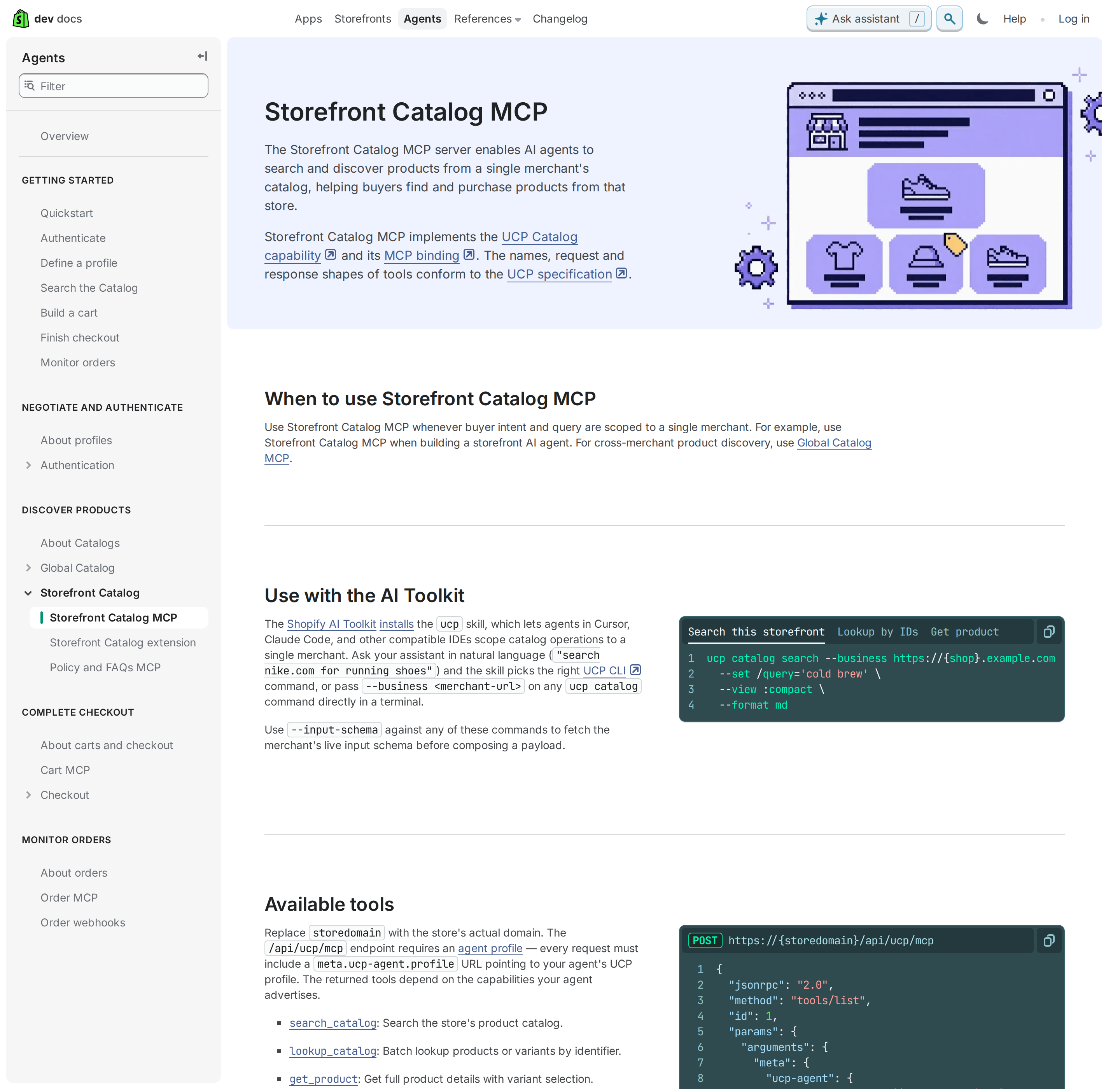
- Storefront / buyer side. Shopify runs UCP (Universal Commerce Protocol) MCP servers that let an external AI agent search a catalog, build a cart, and hand off a checkout for a shopper. This is "agentic commerce" — the AI is acting for a customer.
- Admin / merchant side. Agents that read your orders, products, inventory, and customers need the GraphQL Admin API. Shopify ships no first-party Admin MCP server; every "Shopify admin MCP" you find is a community or third-party wrapper over the same Admin API you would call yourself.
If your goal is "let my team ask the assistant about orders in Slack", you want the second. If your goal is "let ChatGPT buy shoes from my store", you want the first. The rest of this page covers both, then the Admin path in depth because that is where the real integration work lives.
The buyer-side servers: Storefront Catalog and Global Catalog MCP
Shopify's UCP catalog servers expose tools that conform to the UCP specification, not to any Shopify-invented schema:
| Server | Scope | Use when |
|---|---|---|
| Storefront Catalog MCP | A single merchant's catalog | You are building a storefront agent for one shop |
| Global Catalog MCP | Products across all Shopify merchants | Comparison shopping, cross-merchant discovery, recommendations not tied to one store |
The tools (search_catalog, lookup_catalog, get_product) sit behind /api/ucp/mcp, and search_catalog accepts a text query, an image, or a set of product IDs to find similar items. Shopify ships a CLI and an AI Toolkit skill so an agent can pick the right command from natural language:
npm install -g @shopify/ucp-cli
ucp catalog search --business https://{shop}.example.com \
  --set /query='cold brew' \
  --view :compact \
  --format md
One migration to know about: the older Storefront MCP catalog and cart tools on https://{shop}/api/mcp were removed, and their replacements live under UCP. search_catalog/get_product_details moved to Storefront Catalog MCP; get_cart/update_cart moved to the UCP Cart MCP; policies and FAQs stayed on /api/mcp. If you are following an older tutorial that points at /api/mcp for catalog search, it is out of date. Every UCP request now also needs an agent profile attached, and carts are created with create_cart rather than assumed to exist.
That is the entire buyer-side surface. It is genuinely useful if you are building agentic commerce, and it will not help you answer a single question about your own store's open orders — because it is not scoped to your admin at all.
The merchant-side reality: no official Admin MCP, so the Admin API is the spine
There is no mcp.shopify.com hosted admin server. The official MCP registry returns third-party servers such as ai.gossiper/shopify-admin-mcp (a hosted streamable-HTTP/SSE wrapper with an X-API-Key alternative to OAuth), and there are community stdio servers on npm. They all do the same thing under the hood: call the GraphQL Admin API with a token you created.
So the honest choice is not "which MCP server" — it is which layer owns the token:
| Path | Auth | Headless? | Best for |
|---|---|---|---|
| Third-party/community Admin MCP server | OAuth or API key, held by the vendor | Usually yes | Fast start; you accept a third party in the credential path |
| Your own Admin API proxy + skill file | Custom app access token, held by you | Yes | Scheduled jobs, Slack assistants, anything unattended and audit-sensitive |
| Buyer-side UCP MCP | Agent profile | Varies | Storefront agents, not store operations |
For most teams running an assistant against their own store, the second row is the right answer, and it is also the row that teaches you the four things below.
Building the Admin path: custom app, scopes, and a token that is a password
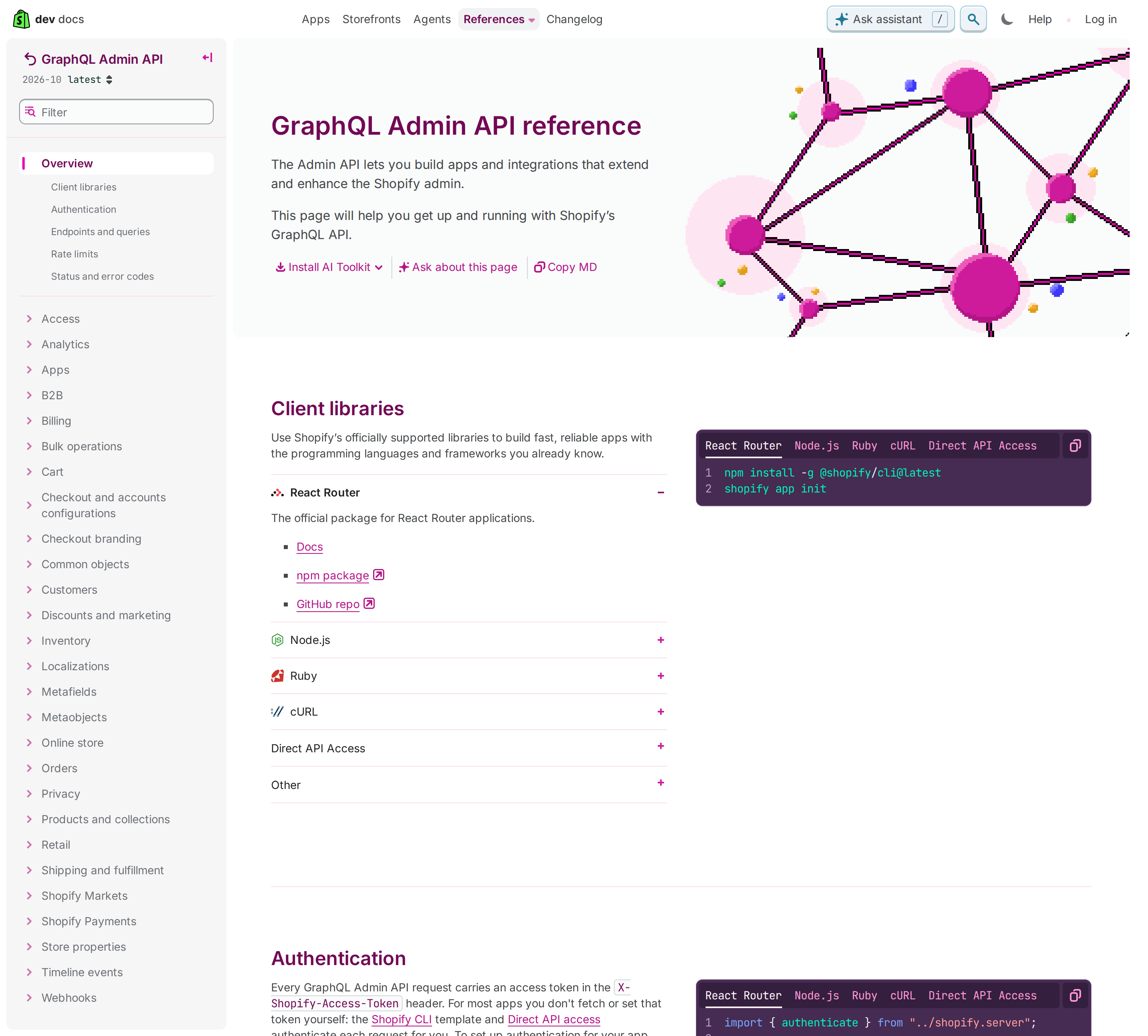
In Shopify Admin, go to Settings → Apps and sales channels → Develop apps → Create an app, configure the Admin API scopes you actually need, install it, and copy the Admin API access token. That token is shown once and behaves like a password.
Two facts about custom apps that decide your architecture:
- A custom app's Admin API token belongs to the store, not to a user. It does not expire on a schedule and there is no OAuth refresh dance — which makes it the ideal credential for an unattended cron job, and also means a leaked token is valid until you rotate it by hand.
- Scopes are declared up front and re-installing is how you change them. There is no "grant one more scope" prompt at call time. Design the scope list from the questions you want to answer, not from the first query you try.
Because the token never expires, treat rotation as a real operational task: store it in a secret manager, keep it out of the skill file, and rotate if a machine that held it is retired.
The API is GraphQL-only for new work, so query cost is your new rate limit
The Admin REST API still exists, but Shopify's own guidance steers new development to GraphQL, and the rate-limit model is completely different. This is the single most common source of "why is my integration throttled" confusion:
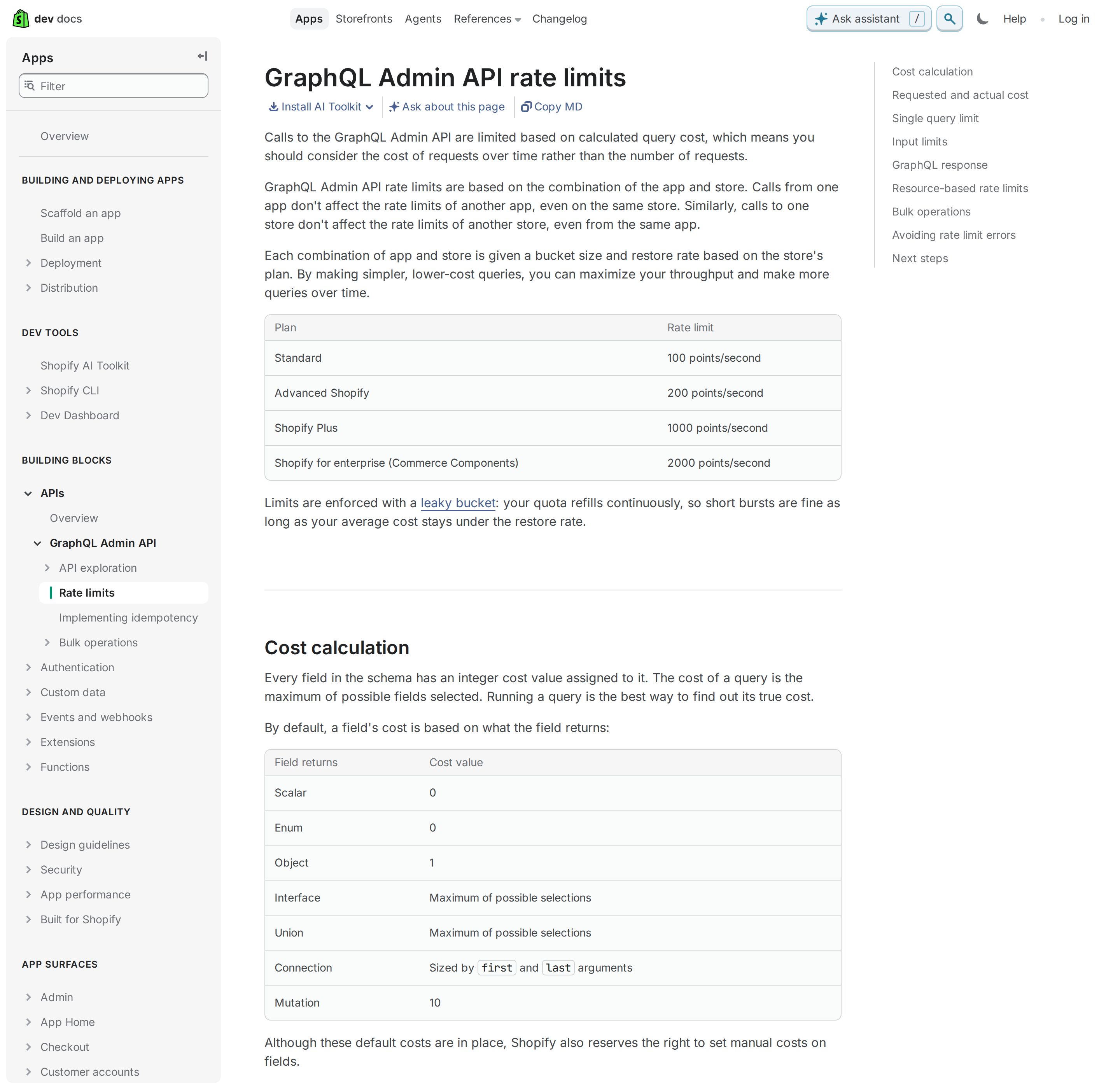
- Rate limits are per app and per store — one app's calls do not affect another app on the same store, and one store's calls do not affect your app on a different store.
- The bucket is measured in points per second, by plan: Standard 100, Advanced 200, Plus 1000, Enterprise (Commerce Components) 2000.
- Every field has a cost: scalars and enums are 0, objects are 1, a mutation is 10, and connections are sized by their
first/lastarguments. A query that asks for 250 orders with 50 line items each is not "one call" in cost terms — it can be hundreds of points. - A single query may not exceed 1,000 points, regardless of your plan. It is rejected before execution, based on requested cost.
- Shopify calculates requested cost before the query and actual cost after, then refunds the difference. Read
extensions.costin every response:
"extensions": {
  "cost": {
    "requestedQueryCost": 101,
    "actualQueryCost": 46,
    "throttleStatus": { "maximumAvailable": 1000, "currentlyAvailable": 954, "restoreRate": 50 }
  }
}
The practical consequence: the fix for throttling is a cheaper query, not a retry loop. Ask for fewer fields, lower first, and split big reads into paged calls. A proxy that logs currentlyAvailable turns "the assistant keeps getting throttled at month-end" into a one-line diagnosis.
And one API-wide constant worth memorising: array inputs are capped at 250 items on every Shopify API. Batch mutations that pass a bigger array simply error.
Versioning: quarterly, and the proxy is the thing that rots
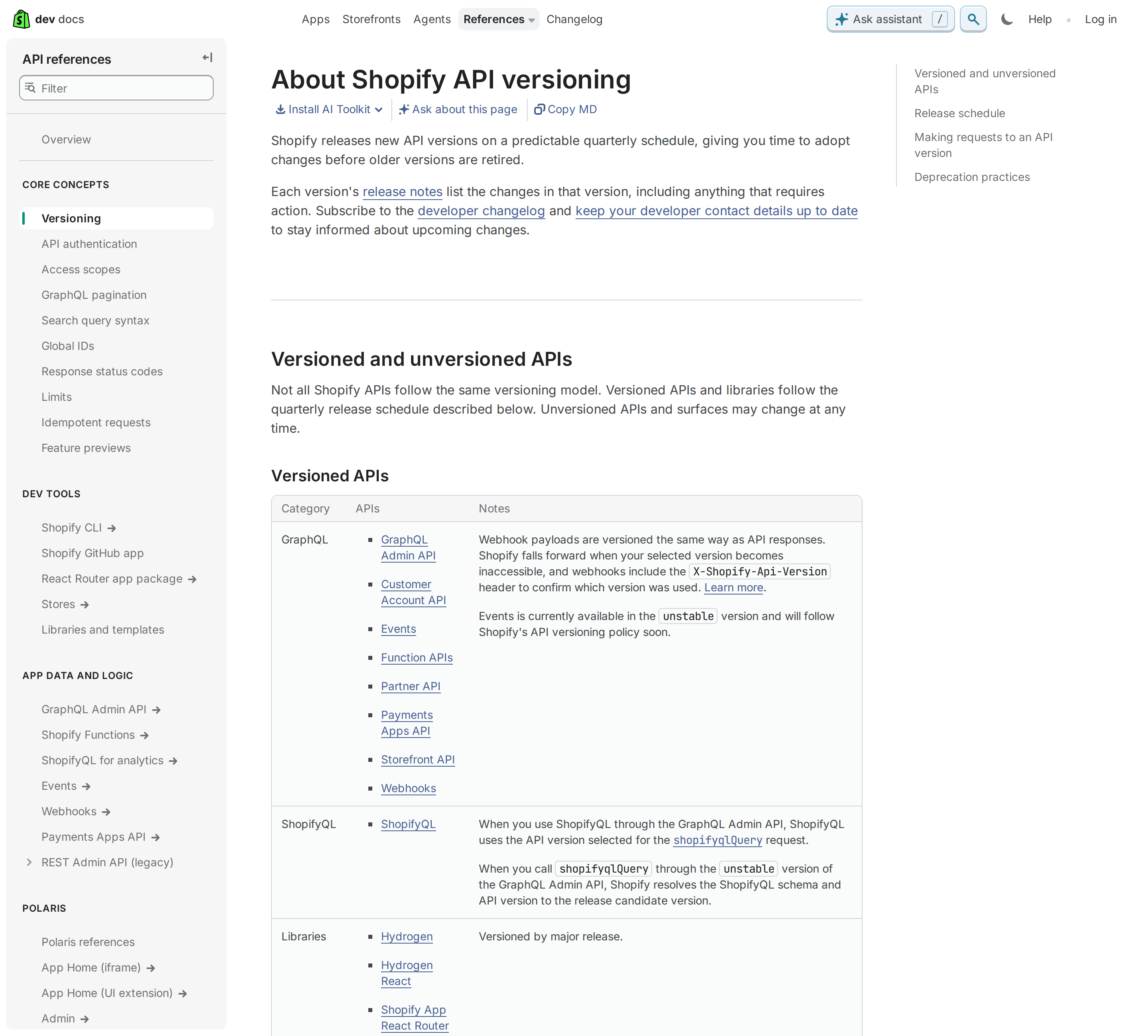
Shopify ships a new API version on a predictable quarterly schedule and retires old ones. The current Admin API version at the time of writing is 2026-10, and the version is part of the URL path.
The trap is not the API — it is the skill file. Teams write a proxy in January against 2024-01, it works for a while, the version is retired, and one morning every order query 404s. Two habits prevent it:
- Pin the version in one place (an env var or a config constant) so bumping it is a one-line change, not a find-and-replace across prompts.
- Subscribe to the developer changelog and put a quarterly "bump the API version" entry in the calendar. Shopify publishes release notes per version and a webhook header (
X-Shopify-Api-Version) that tells you which version actually served a payload, which is invaluable when behaviour shifts after a bump.
REST callers have a second, sneakier versioning problem: REST resources were progressively deprecated in favour of GraphQL, and some functionality only exists in GraphQL. If your proxy is REST-only, that is itself a maintenance liability.
The scopes that gate almost every question
Custom app scopes are the invisible wall behind most "the assistant can't see X" reports. The ones that cover the overwhelming majority of store-operation questions:
read_orders(andread_all_ordersfor orders older than 60 days — this one is easy to miss and produces a confusingly partial result set)read_products/write_productsread_inventoryread_customersread_fulfillments/write_fulfillmentsread_analyticsfor reporting queries
read_all_orders is the classic silent failure. With plain read_orders, an app can only read orders from the last 60 days. Ask for "our revenue last year" and you get a small, plausible-looking number rather than an error. Any proxy that answers historical questions must request the broader scope — and it has to be approved, which is exactly the sort of thing to discover before promising a stakeholder last year's numbers.
Four workflows worth wiring up
These are the questions that actually justify connecting a store to an assistant, each with the GraphQL shape behind it:
1. Morning order digest. "How many orders came in overnight, what's the total value, and are there any unpaid ones?" — an orders query filtered on created_at with displayFinancialStatus, grouped in the proxy. Post the result to Slack so nobody opens the admin to answer a question with a number.
2. Low-inventory sweep before a promo. "Which products have fewer than 10 units left but sold more than 20 last week?" The assistant reads inventoryLevels and recent order line items, then produces a restock list. This is where read_products + read_inventory + read_orders all have to be present at once — a good reason to design scopes together.
3. Customer lookup for support. "What has this email ordered, and is any of it still in transit?" A customer lookup plus fulfilment status answers a support ticket without the agent leaving the thread. Note that customer data is the most sensitive scope you will grant; scope it to exactly the fields support needs.
4. Refund and return triage. "Summarise this week's refunds and flag any customer refunded more than twice." Refund data is in the order's transactions; a proxy that pre-computes the flag keeps the answer short and the token's blast radius small.
Five Shopify-specific pitfalls
- REST vs GraphQL rate limits are not comparable. "40 requests per second" from a REST tutorial does not describe GraphQL, where cost is calculated per field and mutations cost 10. Porting a retry strategy between them produces either needless delays or surprise throttles.
read_all_ordersand the 60-day window. Without it, historical questions return a too-small answer with no error. Verify before trusting any year-over-year number the assistant produces.- Quarterly version churn. A hard-pinned API version in a prompt is a time bomb. Pin it in config and diarise the bump.
- The token is a password with no expiry. A custom app token does not rotate itself. Treat it like a long-lived production secret and rotate deliberately.
- The buyer-side and admin-side servers are unrelated.
api/ucp/mcpsells products to shoppers; it cannot read your orders. Do not point a store-operations assistant at it and wonder why nothing works.
Where Shopify MCP fits next to the alternatives
If your team already lives in Slack, connecting Shopify to OpenClaw gives you a persistent assistant that answers order and inventory questions in-channel, rather than a per-query MCP session that has to be re-authenticated. If you are weighing how much of the workflow should be automated versus answered, compare the Shopify AI automation guide for the scheduled-job angle, or the Shopify + ChatGPT route if you want the connector without a self-hosted client.
Payments and revenue questions usually straddle two systems, so the Stripe MCP guide is the natural companion when a "total sales" number has to reconcile against payouts. And if the store data ultimately feeds reporting, the Google Analytics MCP page covers the traffic side of the same funnel.
One honest caveat
Community and third-party Admin MCP servers are a legitimate shortcut, but they put a third party in the credential path of your store's full Admin API access. A wrapper that holds an admin token can read customers, orders, and financials. If you use one, prefer a vendor that supports a scoped API key over OAuth-brokerage of a broad scope set, read what it logs, and revoke it the day you stop using it. For anything unattended and audit-sensitive, the self-owned custom-app proxy is the path that keeps the token in your hands.
How to Connect Shopify via MCP
There are two main paths:
Option A: Use a community MCP server for Shopify
Shopify does not currently maintain an official MCP server. Community-built options exist — check the MCP Registry and GitHub for the latest.
Note: No official Shopify MCP server yet. Several community-built servers exist that expose the Shopify Admin GraphQL API — check the MCP Registry for current options.
What you'll need:
- An MCP-compatible client (Claude Desktop, OpenClaw, or another host)
- A running MCP server process with Shopify credentials configured
Community servers vary in completeness and maintenance quality — evaluate before deploying to your team.
Option B: Use Cody (OpenClaw-based, managed)
Cody is built on OpenClaw and supports MCP-compatible integrations out of the box. You connect Shopify once from the Cody dashboard — no server to run, no code to write — and Cody handles authentication, context passing, and write-back actions with appropriate guardrails.
Cody works where your team already operates: Slack, Telegram, or the web chat. The Shopify connection is available to your entire team without each person setting up their own MCP client.
Want Shopify Connected to AI Without Running Your Own MCP Server?
Cody gives your team a Shopify assistant in Slack, so people can check orders, customers, products, inventory, and store activity without wiring Admin API auth, handling version churn, or building ecommerce workflow glue.
MCP vs Other AI Integration Patterns
| Approach | What it is | Tradeoff |
|---|---|---|
| MCP | Standardised protocol for live tool access | Requires an MCP server; most powerful when set up correctly |
| RAG (retrieval) | Pre-index Shopify content and retrieve it | Good for static docs; not suitable for live/transactional data |
| Manual copy-paste | Paste Shopify output into ChatGPT/Claude | Fast to start; breaks for anything recurring or at scale |
| Custom API wrappers | Bespoke integration code per tool | Full control; high maintenance overhead |
MCP wins when you need live data from Shopify and want to avoid rebuilding integrations as APIs change.
Common Mistakes
- Using training data when live data is needed — if the AI doesn't have an MCP connection, it will answer from memory, which is often outdated or wrong for account-specific questions
- No write-back guardrails — MCP can write to Shopify, so it's worth adding an approval step for any action that modifies records
- Too many tools exposed at once — give the AI access to the Shopify actions it actually needs; a scoped connection is easier to reason about and audit
- Skipping structured outputs — ask the AI to return structured JSON or clear fields when writing back to Shopify; free-form output is harder to validate
Related MCP Guides
Want the full workflow picture? See: Shopify AI Automation and How to Connect Shopify to OpenClaw.