If you're searching for "Mixpanel MCP", you're asking one of two things: does Mixpanel have an MCP server? or how do I connect Mixpanel to an AI assistant via the Model Context Protocol?
✅ Mixpanel has an official MCP server. Details in the setup section below.
What Is MCP?
Model Context Protocol (MCP) is an open standard developed by Anthropic that lets AI assistants — like Claude — connect to external tools, APIs, and data sources in a standardised way.
Before MCP, every AI integration required bespoke tooling: custom prompts, custom API wrappers, and custom glue code to pass context back and forth. MCP replaces that with a common interface: the AI asks the MCP server for data or actions, the server returns structured results, and the AI uses them to answer your question or complete a task.
In plain terms: MCP is how you give an AI assistant live access to Mixpanel — not just knowledge about it, but real, up-to-date data from your account.
What a Mixpanel MCP Integration Does
Once Mixpanel is connected via MCP, your AI assistant can:
- Read live data — pull records, metrics, activity, and status directly from Mixpanel
- Take actions — create, update, or log records based on your instructions
- Cross-reference context — combine Mixpanel data with other connected tools mid-conversation
The key difference from a standard chatbot: the assistant is not working from training data or memory. It is reading your actual Mixpanel instance, in real time.
Practical Mixpanel MCP Use Cases
Natural-language metric queries
"What was our activation rate last week vs the week before?" The assistant queries Mixpanel via MCP and returns the numbers with a plain-English interpretation.
Anomaly explanation
When a metric spikes or drops, the assistant can pull recent data from Mixpanel and generate a hypothesis list: campaign changes, product releases, seasonality, tracking issues.
On-demand segment analysis
Ask the assistant to compare behaviour across user segments in Mixpanel and return a concise breakdown — without writing a query.
Mixpanel MCP: Real Configuration & Setup (as of 2026)
Mixpanel now ships an official, hosted, first-party MCP server — this is not a community wrapper. Mixpanel announced it in beta in April 2026 and it is now generally available, running at a hosted remote endpoint that authenticates over OAuth and exposes Mixpanel's analytics, dashboards, Lexicon, cohorts, experiments, and feature flags as callable tools.
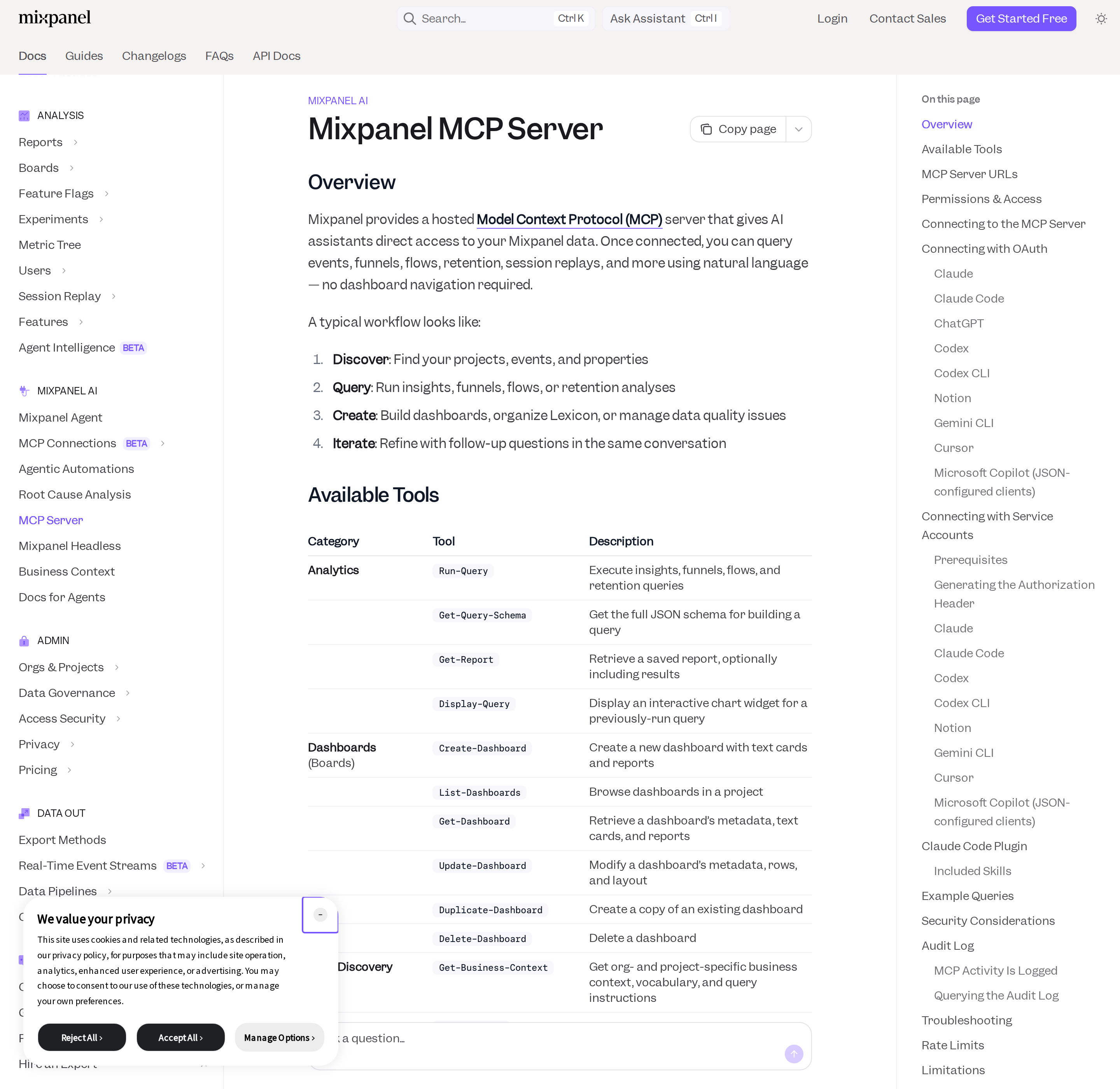
Mixpanel's official MCP docs — hosted remote server, OAuth or service-account auth, read AND write tools.
If you landed here from an older guide that says "Mixpanel has no MCP server, use a community wrapper", that information is stale. The community servers still exist (and are still useful for some ingestion jobs), but the supported path is now Mixpanel's own hosted server.
The three regional endpoints — pick the right one first
Mixpanel runs regional MCP servers. Connecting to the wrong region is the single most common setup mistake: OAuth completes, tools list fine, and then queries return nothing or an empty result set.
| Region | MCP Server URL |
|---|---|
| United States (default) | https://mcp.mixpanel.com/mcp |
| European Union | https://mcp-eu.mixpanel.com/mcp |
| India | https://mcp-in.mixpanel.com/mcp |
Match the region to where your Mixpanel data actually resides — not where your team sits.
Wiring it into an MCP client
The transport is standard Streamable HTTP with OAuth, so any MCP-compatible client can point at the endpoint directly. The clients Mixpanel documents one-by-one: Claude (web + Desktop), Claude Code, ChatGPT, Codex (app + CLI), Notion, Gemini CLI, Cursor, and Microsoft Copilot.
Claude Code (one command):
claude mcp add --transport http mixpanel https://mcp.mixpanel.com/mcp
Then run /mcp inside Claude Code and complete the Mixpanel OAuth flow in your browser.
JSON-configured clients (Cursor, Copilot, Claude Desktop via mcp-remote):
{
  "mcpServers": {
    "mixpanel": {
      "command": "npx",
      "args": ["-y", "mcp-remote", "https://mcp.mixpanel.com/mcp"]
    }
  }
}
The first connect prompts you to authorize with Mixpanel. Because the transport is plain HTTP + OAuth, a self-hosted client like OpenClaw can point straight at the endpoint with no vendor certification.
OAuth vs service accounts — the headless split
Mixpanel's MCP server supports two authentication methods, and choosing the wrong one is the second-most-common setup failure:
| Method | Best for | Headless? |
|---|---|---|
| OAuth | Interactive use in Claude, ChatGPT, Cursor | ❌ Needs a browser sign-in |
| Service accounts (Beta) | CI/CD pipelines, automated agents, shared team setups | ✅ Static credential header |
OAuth is the right default for interactive assistants. But it cannot drive an unattended scheduled job, because it requires a browser round-trip. For anything that has to run without a human — a nightly metric digest, a scheduled anomaly check — use a service account, which authenticates with a static header and no browser.
The service-account header is a base64-encoded username:secret pair, passed as a bearer token:
echo -n "<username>:<secret>" | base64
# header value:
# Authorization: Bearer Basic <base64-encoded-credentials>
Treat that base64 string like a password — put it in an environment variable or secret manager, never in a committed config file. Service-account MCP auth is in Beta, so the interface may change.
What the server actually exposes
The tool surface is broad and splits into read and write. Highlights:
| Category | Example tools | Notes |
|---|---|---|
| Analytics | Run-Query, Get-Query-Schema, Get-Report, Display-Query |
Insights, funnels, flows, retention |
| Dashboards (Boards) | Create-Dashboard, Update-Dashboard, List-Dashboards |
Build and edit boards from chat |
| Data discovery | Get-Business-Context, Get-Events, List-Properties, Search-Entities |
Learn your taxonomy before querying |
| Lexicon / data management | Edit-Event, Edit-Property, Bulk-Edit-Events, Create-Tag |
Writes — bulk edits cap at 50 per call |
| Cohorts | Create-Cohort, Update-Cohort, List-Cohorts |
Definitions, not raw membership |
| Experiments (Beta) | Create-Experiment, Get-Experiment-Results-Interpretation-Guidance |
Open beta, all users |
| Feature flags (Beta) | Create-Feature-Flag, Get-Feature-Flag-Lifecycle-Guidance |
Open beta, all users |
| Audit log (Beta) | Get-Audit-Log |
Org admin / owner only, limited beta |
The Get-Business-Context tool is the one to reach for first: it returns org- and project-specific vocabulary, business context, and query instructions, so the assistant stops guessing at your event names.
The Claude Code plugin (a real differentiator)
Mixpanel ships an open-source Claude Code plugin (mixpanel/ai-plugins) that layers guided skills on top of the MCP connection — deep-research (structured root-cause investigation), analyze-report, create-dashboard, manage-lexicon, tracking-implementation, and more. The skills run through whichever engine you configure: the MCP server or the mixpanel-headless Python SDK.
claude plugin marketplace add mixpanel/ai-plugins
claude plugin install mixpanel
# then, inside Claude Code:
/mixpanel:install
If MCP is already connected, the skills use that connection automatically — no extra setup.
How to Connect Mixpanel via MCP
There are two main paths:
Option A: Use Mixpanel's official MCP server
Mixpanel maintains an official Mixpanel MCP server. This is the recommended starting point — it's built and maintained by the Mixpanel team, so it stays up to date with API changes.
Note: Mixpanel ships an official hosted MCP server at https://mcp.mixpanel.com/mcp (EU: https://mcp-eu.mixpanel.com/mcp, IN: https://mcp-in.mixpanel.com/mcp). Streamable HTTP + OAuth for interactive clients, or a service-account (Beta) static header for headless/automated use. MCP must be enabled by an org admin on accounts created before August 1, 2026.
What the server exposes:
- Run insights, funnels, flows, and retention queries (Run-Query)
- Create and edit dashboards (Boards) from chat
- Discover events, properties, and business context
- Manage Lexicon metadata, tags, and PII flags
- Create and update cohorts
- Experiments and feature flags (Beta)
- Audit log history via Get-Audit-Log (org admin, limited beta)
What you'll need:
- An MCP-compatible client (Claude Desktop, OpenClaw, or another host)
- Mixpanel credentials configured per the server's setup guide
This path gives you the most control but requires you to handle client configuration and credential management yourself.
Option B: Use Cody (OpenClaw-based, managed)
Cody is built on OpenClaw and supports MCP-compatible integrations out of the box. You connect Mixpanel once from the Cody dashboard — no server to run, no code to write — and Cody handles authentication, context passing, and write-back actions with appropriate guardrails.
Cody works where your team already operates: Slack, Telegram, or the web chat. The Mixpanel connection is available to your entire team without each person setting up their own MCP client.
Want Mixpanel Connected to AI Without Running Your Own MCP Server?
Cody gives your team a Mixpanel AI assistant in Slack, so people can review funnel conversion, retention cohorts, feature adoption, and product KPI changes without rebuilding reports or doing event-name archaeology by hand.
MCP vs Other AI Integration Patterns
| Approach | What it is | Tradeoff |
|---|---|---|
| MCP | Standardised protocol for live tool access | Requires an MCP server; most powerful when set up correctly |
| RAG (retrieval) | Pre-index Mixpanel content and retrieve it | Good for static docs; not suitable for live/transactional data |
| Manual copy-paste | Paste Mixpanel output into ChatGPT/Claude | Fast to start; breaks for anything recurring or at scale |
| Custom API wrappers | Bespoke integration code per tool | Full control; high maintenance overhead |
MCP wins when you need live data from Mixpanel and want to avoid rebuilding integrations as APIs change.
Common Mistakes
- Using training data when live data is needed — if the AI doesn't have an MCP connection, it will answer from memory, which is often outdated or wrong for account-specific questions
- No write-back guardrails — MCP can write to Mixpanel, so it's worth adding an approval step for any action that modifies records
- Too many tools exposed at once — give the AI access to the Mixpanel actions it actually needs; a scoped connection is easier to reason about and audit
- Skipping structured outputs — ask the AI to return structured JSON or clear fields when writing back to Mixpanel; free-form output is harder to validate
Mixpanel MCP-Specific Pitfalls
These are the failure modes that only show up once you're actually running Mixpanel's MCP server against a real project.
-
MCP is off by default on older accounts. Accounts created before August 1, 2026 require an organization admin to enable MCP in Settings → Org → Overview before anyone can connect. New free/growth accounts have it on by default. "MCP access is not enabled for this project" is a settings problem, not a credential problem — and changes can take up to 15 minutes to take effect.
-
The region mismatch is silent. Connecting to the US endpoint when your data is in the EU (or India) authenticates fine and then returns empty results. There is no error — just nothing. Set the endpoint to match where the data lives.
-
MCP is per-user, and inherits that user's permissions. Users authenticate with their own Mixpanel credentials, so the assistant can only see projects that user already has access to. A query that "should" work but returns nothing is often a project-permissions gap, not a tool bug.
-
Cohort filters and breakdowns are NOT supported in
Run-Query, and neither are SCD fields. Queries run through MCP cannot filter or break down by cohort, and MCP tools do not support Slowly Changing Dimension / profile-history properties. Both must be done in the Mixpanel UI. Asking for them in chat produces a silently reduced answer. -
Service-account auth is Beta, and MCP cannot be used for event ingestion. The service-account interface may change — pin your integration accordingly. And note what MCP is not: it queries and manages Mixpanel metadata; it does not replace your SDK or ingestion pipeline.
-
Rate limit is 600 MCP requests per hour, per user. A chatty agent that fans out across many queries or bulk Lexicon edits can hit this. Failed and read-only tool calls are not logged in the audit log, but they still count against the request budget.
-
Writes are real, logged, and attributed to the connecting account. MCP tools create dashboards, cohorts, experiments, and feature flags — and edit Lexicon metadata, including PII flags. Every change is recorded in the org audit log with an
Originof MCP, attributed to the account the assistant is connected as. Read-only and failed calls are not logged. Add a confirmation step before bulk writes. -
"Missing scope" needs the
.mcp-authfolder deleted, not a reinstall. If you change scopes (or Mixpanel adds tools), the cached auth token carries an outdated scope list. The documented fix is to delete the.mcp-authfolder in the directory where you ran the authorization command and re-authorize. Desktop apps also need a full restart after config edits. -
Data leaves your Mixpanel account and goes to the model provider. Mixpanel's own security notes say your Mixpanel data is sent to whichever AI provider you connect (Claude, ChatGPT, etc.). Review that provider's data handling before connecting projects that hold personal data, and check GDPR/CCPA obligations first.
Related MCP Guides
Want the full workflow picture? See: Mixpanel AI Automation and How to Connect Mixpanel to OpenClaw.