Discord is a natural home for an AI assistant when your team or community already works in channels, threads, and role-based spaces. Cody can sit inside that server to summarise conversations, answer questions with context from your connected tools, and help moderators, operators, or internal teams stay on top of what matters.
How OpenClaw Integrations Work
OpenClaw is a self-hosted AI assistant that runs on your own server — typically an EC2 instance — and connects to Slack. It uses Claude under the hood to process requests. Out of the box, OpenClaw doesn't ship with pre-built connections to third-party tools. Instead, integrations are built using the skills system: markdown files in ~/.openclaw/skills/ that give Claude instructions for a particular domain, combined with HTTP tool calls to any API you expose to it.
In practice, adding a real integration means: getting API credentials from the third-party service, building or configuring a small proxy/endpoint that OpenClaw can call, and writing a skill file that tells Claude how to use it. For some tools this is an afternoon of work. For others — like Discord — it's considerably more involved.
Connecting OpenClaw with Discord: Step by Step
Step 1: Create a Discord Application and Bot
Go to the Discord Developer Portal, create a new application, and add a Bot user. Under the Bot settings, copy the Bot Token. You'll also need to enable the Message Content Intent — this privileged intent is required for OpenClaw to read message text. Without it, the bot can only see mentions and slash command payloads.
Step 2: Set the Required Permissions and Invite the Bot
In the OAuth2 URL Generator, select the bot scope and the permissions your bot needs: Read Messages/View Channels, Send Messages, Read Message History. Generate the invite URL and use it to add the bot to your server. Once it's in, configure your OpenClaw instance with the bot token and the Guild (server) ID it should respond in.
Step 3: Configure Gateway Intents and Test
Discord's Gateway API uses Intents to control which events your bot receives. OpenClaw needs at minimum GUILD_MESSAGES and MESSAGE_CONTENT (privileged). Set these in your application's bot settings and in your OpenClaw configuration. Test by mentioning the bot in a channel — it should respond via Claude within a few seconds.
Challenges and Caveats
Message Content Intent Is Now Privileged
As of 2022, Discord requires explicit approval for bots that read message content in servers with over 100 members. For small teams this is approved automatically, but for larger communities or public bots, you need to apply for verification and the privileged intent. This can take time and isn't guaranteed for bots with broad access.
Discord Rate Limits Are Per-Route
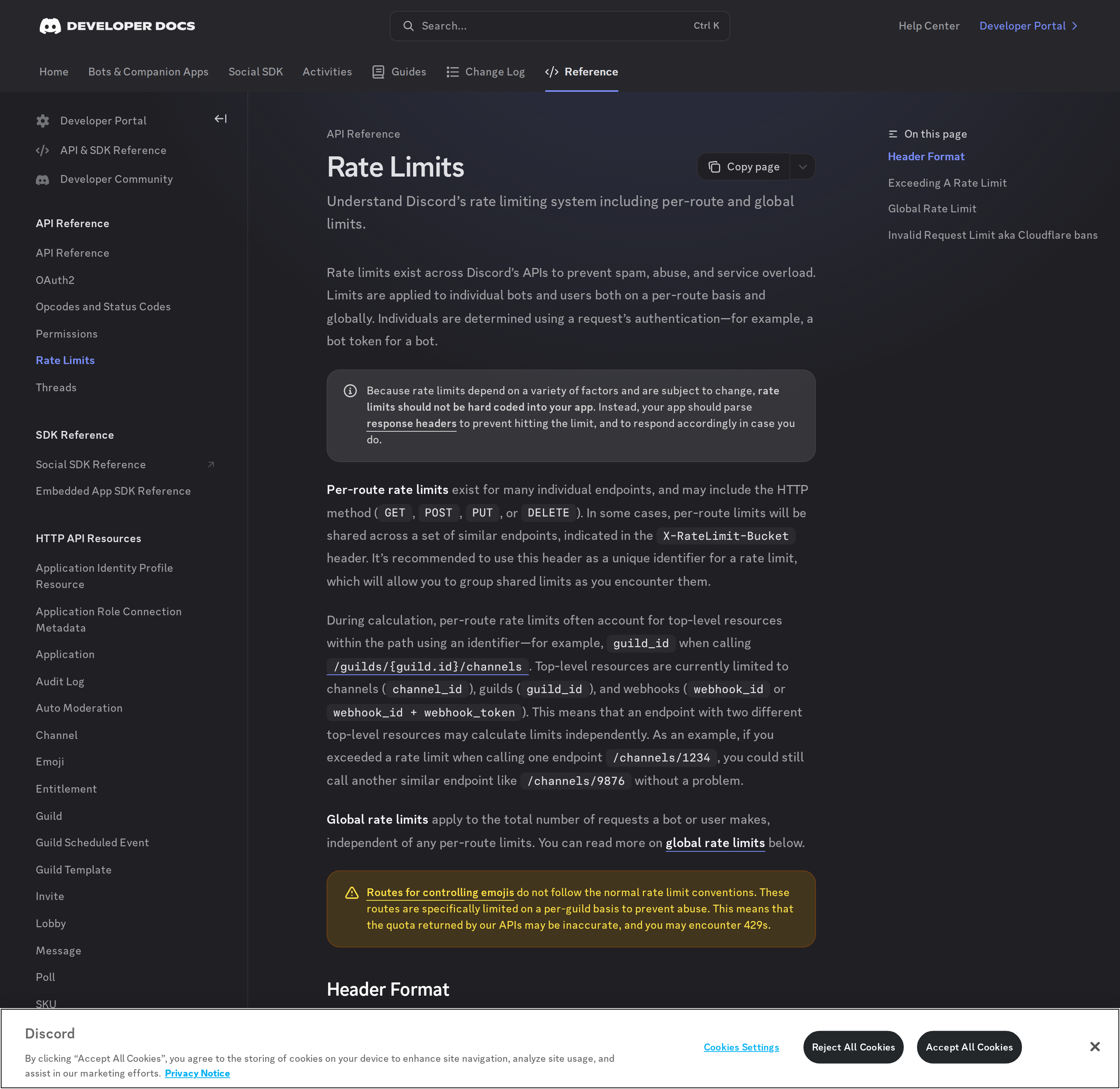
Discord's API applies rate limits per route (endpoint + HTTP method). Sending many messages in quick succession will hit the POST /channels/{id}/messages rate limit. For bots responding to high message volume, OpenClaw needs rate limit aware queuing.
Discord + OpenClaw in 2026: What Actually Works
If you searched "how to connect Discord to OpenClaw," you probably want one of two things: a bot that lives in your server and answers questions with real context, or a way to get channel activity into an AI workflow without babysitting a custom bot. The base setup above gets a bot online. This section covers what Discord's platform actually allows in 2026 — because Discord ships no official first-party MCP server, and the ecosystem splits cleanly into two very different approaches.
Does Discord have an official MCP server? No — and that shapes everything
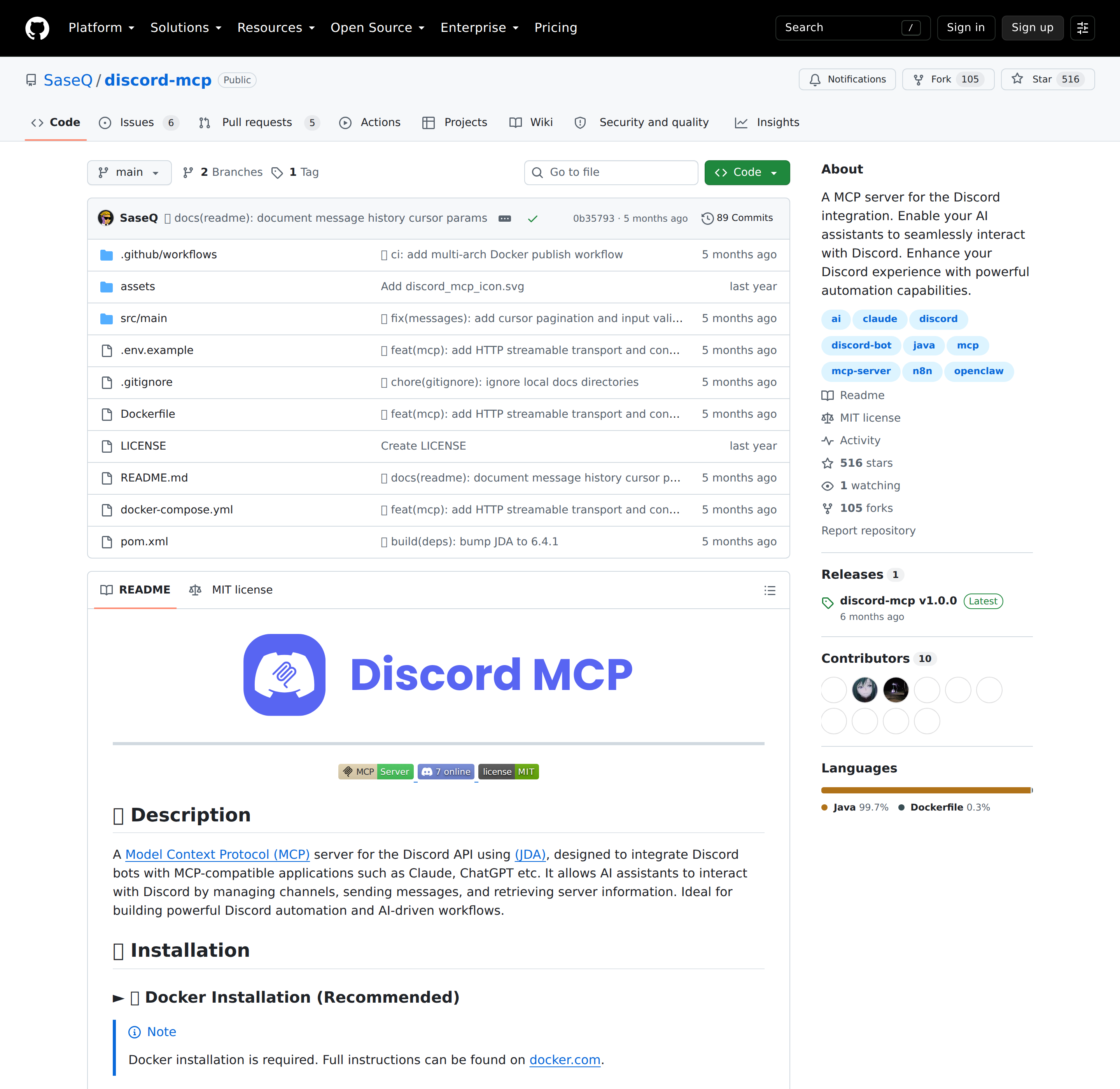
Unlike Stripe (mcp.stripe.com), HubSpot (mcp.hubspot.com), or Segment's owner Twilio, Discord has no hosted first-party MCP endpoint. There is no mcp.discord.com. Everything marketed as "Discord MCP" is a community server wrapping the same public Discord Bot API + Gateway you would use by hand.
That is not a bad thing — it means you have full control and no vendor certification gate — but it also means there is no vendor to call when it breaks, and the tool surface, update cadence, and security posture are the maintainer's problem, not Discord's.
The three paths, honestly compared
| Path | Transport / auth | Headless-friendly? | Best for |
|---|---|---|---|
| A. Community MCP server (e.g. SaseQ/discord-mcp, Docker, JDA-based) | HTTP (streamable) or legacy stdio; a Bot Token | ✅ Yes — it is a long-running process you own | Interactive assistants and unattended agents — the widest surface |
| B. Direct Bot API + Gateway + skill file | REST discord.com/api/v10 with Authorization: Bot <token>; Gateway websocket for events |
✅ Yes | Full control, minimal dependencies, exactly the tools you need |
C. Community "agent" servers (e.g. 71-tool discord-agent-mcp, 208-tool cappyeo/discord-mcp) |
HTTP / stdio; Bot Token | ✅ Usually | Large servers that need moderation, roles, scheduled events, auto-mod |
The important nuance: because Discord's surface is a bot token, not an interactive OAuth consent screen, every one of these paths is headless-capable. That is the opposite of the Dropbox/Notion/Asana situation, where the hosted MCP is interactive-only and cron jobs need a separate REST path. Here you can run one process for both.
Path A in practice: the OpenClaw connection
SaseQ/discord-mcp ships an OpenClaw connection command in its own README — this is not us inventing a path, it is the maintainer documenting it:
openclaw mcp set discord-mcp '{"url":"http://localhost:8085/mcp","transport":"streamable-http"}'
openclaw mcp list
Run the server itself in Docker (HTTP singleton mode is the recommended profile — one process, many client sessions):
docker run -d -i --name discord-mcp --restart unless-stopped -p 8085:8085 \
  -e SPRING_PROFILES_ACTIVE=http \
  -e DISCORD_TOKEN=<YOUR_BOT_TOKEN> \
  -e DISCORD_GUILD_ID=<OPTIONAL_DEFAULT_SERVER_ID> \
  saseq/discord-mcp:latest
Two details worth calling out from that README. First, SPRING_PROFILES_ACTIVE=http selects singleton HTTP mode; the legacy stdio profile spawns a new container per client session, which is wasteful and loses rate-limit state. Second, DISCORD_GUILD_ID is optional but load-bearing: when set, any tool that accepts a guildId can omit it, so your prompts stop needing to restate the server ID. Health check lives at http://localhost:8085/actuator/health.
Real Use Cases: What an OpenClaw + Discord Setup Actually Does
These are concrete workflows, not "automate your community" filler.
1. Daily channel digest instead of scrolling
Each morning, OpenClaw reads the last 24h of your #general, #support, and #ops channels and posts one summary: what shipped, what's blocked, what needs a decision. The bot needs Read Message History + View Channels for those channels only — not the privileged Message Content intent, if the content it reads comes from channels where the bot is explicitly mentioned or from slash-command payloads.
2. Support triage with context from your other tools
A member posts a bug report. OpenClaw reads it, checks whether the same symptom exists in your connected tracker or docs, and replies in the thread with a candidate fix and a link — then, if unresolved, tags the right role. This is where the cross-tool part matters: raw Discord MCP only sees Discord; an OpenClaw agent can combine the Discord thread with your Notion page, Linear issue, or Stripe subscription state.
3. Moderation questions answered from a ruleset
Ask: "Is this message against our rules?" and have the bot retrieve the relevant rule from your policy doc before answering — instead of a moderator guessing. Keep this advisory; do not give the agent unilateral ban/kick permissions until you have watched it for a while (see pitfalls).
4. Scheduled standups and rollups
Post a Monday standup prompt to #team, collect replies for the day, and have OpenClaw summarise them into #team-summary at end of day. Because the token path is headless, this runs on a cron with no human online.
5. Escalation bridge from community to internal channels
When a #support thread goes unanswered for N minutes, OpenClaw cross-posts a summary into your internal #eng-oncall channel with a link back. The server and channel IDs are the only config; no code changes to your existing bot need to happen if you use the MCP path.
Discord-Specific Pitfalls (Read Before You Grant Permissions)
These are the traps that are specific to Discord + an AI agent — the ones a generic "connect an API" guide will not warn you about.
-
The Message Content intent is privileged, and the rules changed. Discord now explicitly publishes a "You Might Not Need a Privileged Intent" guide because developers enable privileged intents out of habit. Apps under 10,000 server-installed users can toggle privileged intents in the Developer Portal; past that, you must apply and justify the use case. There are three privileged intents: Guild Presences, Guild Members, and Message Content. Design your bot so it reads only what it needs — an agent that summarises mentioned threads can often avoid Message Content entirely.
-
Rate limits are per-route and global, and must never be hard-coded. Discord's docs are blunt: "rate limits should not be hard coded into your app" — parse the response headers instead. The headers are
X-RateLimit-Limit,X-RateLimit-Remaining,X-RateLimit-Reset,X-RateLimit-Reset-After, andX-RateLimit-Bucket.X-RateLimit-Bucketis the key one: it groups endpoints that share a limit, so you should treat it as the unique rate-limit identifier rather than assuming each endpoint is independent. Top-level resources currently limited independently are channels, guilds, and webhooks — meaning/channels/1234and/channels/9876are separate buckets, and one being limited does not block the other. -
X-RateLimit-GlobalandX-RateLimit-Scopeonly appear on 429s. If your agent fires a burst of messages and gets a 429 withoutX-RateLimit-Global, it hit a per-route limit (wait and retry afterRetry-After). IfX-RateLimit-Globalis present, the bot has hit the global limit for every route and all traffic is blocked — a much bigger deal. An agent that ignores the distinction will back off wrongly and either spam retries or stall the whole bot. -
Emoji routes deliberately lie about their quota. Discord documents that the routes for controlling emojis "do not follow the normal rate limit conventions" and are limited per-guild to prevent abuse — the quota returned by the API may be inaccurate and you may still get 429s. If your agent manages reactions or emoji, expect false-positive remaining counts.
-
A bot token is full-access for everything the bot can see. Unlike a scoped OAuth grant per member, the bot token is a single credential with the bot's whole permission set. Anyone who reads it from your config, a Docker env file, or a screenshot owns your server's bot actions. Store it in a secret manager or an env file with tight permissions — the SaseQ README's own examples show the token inline in the
docker runcommand, which is fine for a laptop and a mistake in production. -
Never hand an agent kick/ban/role-management without a review step. Community "agent" servers expose moderation and auto-mod tools. An agent with write access to roles can lock people out or grant privileges by hallucinating a member name. Route destructive moderation through an approval step (draft-then-confirm) until you have observed the agent's behaviour for weeks.
-
Discord is cloud-only and official-serverless — plan for maintainer risk. There is no self-hosted Discord and no vendor-owned MCP. If the community server you chose goes unmaintained, you own the migration. Pinning to a version you have read, and keeping an escape hatch to the plain Bot API + skill file (Path B), is the durable choice.
Also read
- Connecting OpenClaw with Slack: A Practical Guide — the closest internal-comms comparison, including where Slack's event model differs from Discord's Gateway intents
- Connecting OpenClaw with Telegram: A Practical Guide — another messaging platform where the ecosystem is community-built rather than vendor-official
- Discord MCP: The Community Server Landscape — the MCP-collection view of the same ecosystem, with the bot-vs-MCP tool surface side by side
Skip All of This — Use Cody Instead
Cody gives your team a Discord AI assistant that can summarise channels, triage support or community questions, and pull context from your connected tools without making you build or maintain custom bot infrastructure.
Related Guides
- Connecting OpenClaw with Slack: A Practical Guide
- Connecting OpenClaw with Telegram: A Practical Guide
- Connecting OpenClaw with Notion: A Practical Guide
Need the model-flexible version? See: How to Connect Discord to OpenClaw: Setup, Models, and Workflow Guide.