If you're searching for "Zapier MCP", you're asking one of two things: does Zapier have an MCP server? or how do I connect Zapier to an AI assistant via the Model Context Protocol?
✅ Zapier has an official MCP server. Details in the setup section below.
What Is MCP?
Model Context Protocol (MCP) is an open standard developed by Anthropic that lets AI assistants — like Claude — connect to external tools, APIs, and data sources in a standardised way.
Before MCP, every AI integration required bespoke tooling: custom prompts, custom API wrappers, and custom glue code to pass context back and forth. MCP replaces that with a common interface: the AI asks the MCP server for data or actions, the server returns structured results, and the AI uses them to answer your question or complete a task.
In plain terms: MCP is how you give an AI assistant live access to Zapier — not just knowledge about it, but real, up-to-date data from your account.
What a Zapier MCP Integration Does
Once Zapier is connected via MCP, your AI assistant can:
- Read live data — pull records, metrics, activity, and status directly from Zapier
- Take actions — create, update, or log records based on your instructions
- Cross-reference context — combine Zapier data with other connected tools mid-conversation
The key difference from a standard chatbot: the assistant is not working from training data or memory. It is reading your actual Zapier instance, in real time.
Practical Zapier MCP Use Cases
Trigger and inspect automations from chat
Ask the assistant to list recent workflow runs in Zapier, identify failures, and explain what went wrong — so you can debug faster.
Workflow creation from description
Describe what you want to automate; the assistant drafts the workflow structure and, via MCP, creates or updates it in Zapier.
AI steps inside your existing workflows
Use Zapier to trigger the AI step — via MCP — and get structured outputs (classifications, summaries, extracted fields) back into your automation flow.
Zapier MCP: The Official Server, Setup, and Modes (as of 2026)
The good news first: Zapier ships a real, first-party, hosted MCP server — not a community wrapper. The canonical endpoint is:
https://mcp.zapier.com/api/v1/connect
Every MCP client connects to that same URL. Zapier holds your app credentials, so your AI client never touches a third-party API key — OAuth, token refresh, and rate limiting are all handled on Zapier's side under its SOC 2 Type II controls.
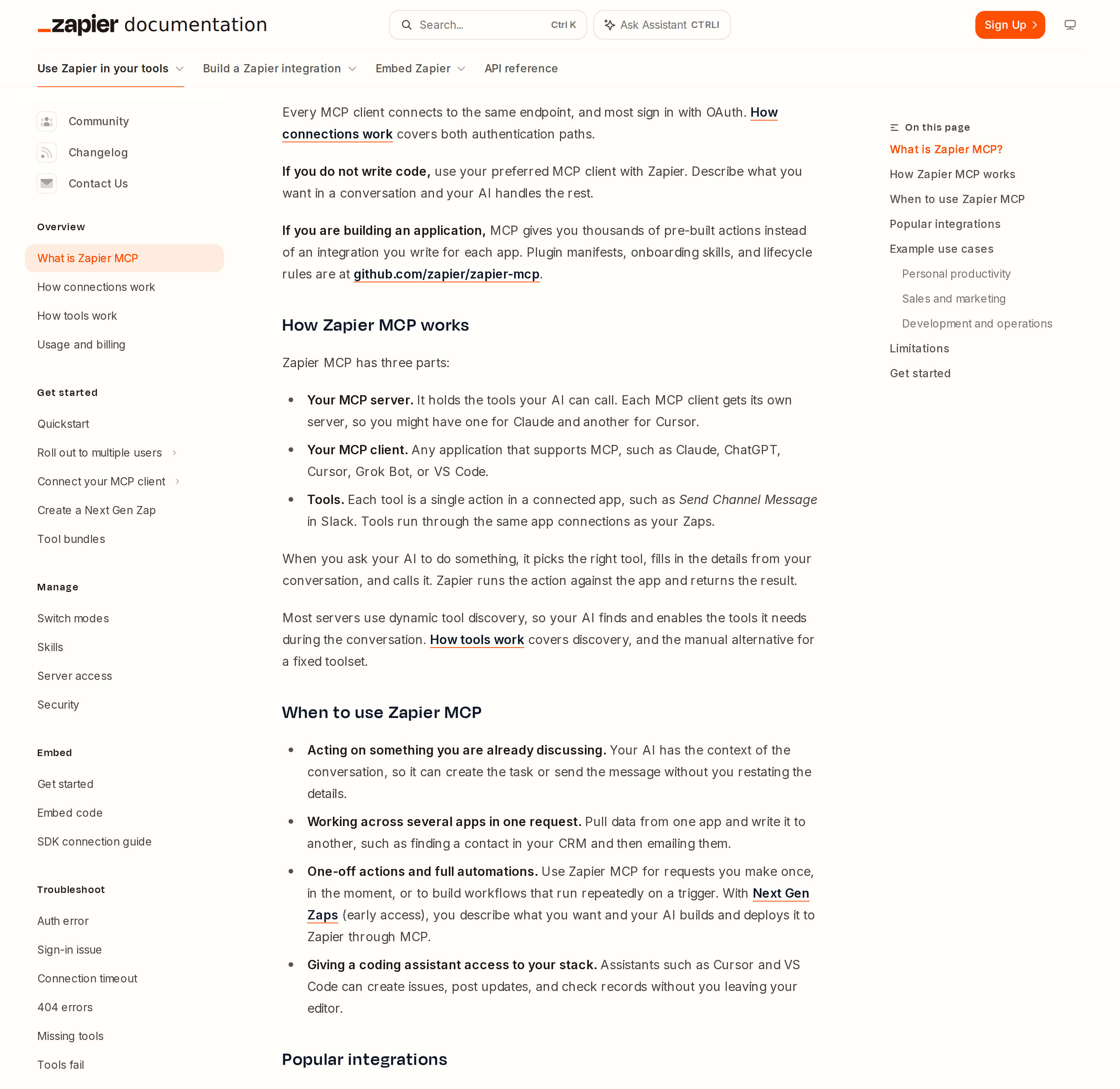
Zapier MCP is a hosted endpoint, not a self-hosted binary: one URL, one sign-in, and your assistant gets the same governance model as the rest of Zapier.
That fact alone puts Zapier in a different bracket from most tools. There is nothing to install, no local process to keep alive, and no token to hand-roll unless you are writing code.
Two auth paths, and why most people should never see the second one
Zapier's own docs are unusually direct about this: the default is OAuth from inside the MCP client, and Zapier creates and configures the server for you during sign-in. The docs explicitly tell agents not to send users off to create a server by hand first.
| Method | Who it applies to | Who creates the server |
|---|---|---|
| OAuth | Any MCP client on the supported list (Claude, ChatGPT, Cursor, Grok Bot, VS Code, and more) | Zapier, during sign-in |
| Connection token | An unlisted MCP client, or your own Python / TypeScript code | You, at mcp.zapier.com |
The connection-token path is the one that matters for a self-hosted agent, because OAuth requires an interactive browser sign-in that cron jobs cannot complete. Two forms are supported:
| Form | How it looks |
|---|---|
| Authorization header (preferred) | Authorization: Bearer YOUR_CONNECTION_TOKEN sent to the endpoint above |
| URL query parameter | .../api/v1/connect?token=YOUR_CONNECTION_TOKEN |
Zapier's docs say to prefer the header, because a URL is more likely to end up in a log, shell history, or a committed config file. Treat the token like a password, give each user their own server and token rather than sharing one, and remember it is shown exactly once — regenerating invalidates the old one immediately.
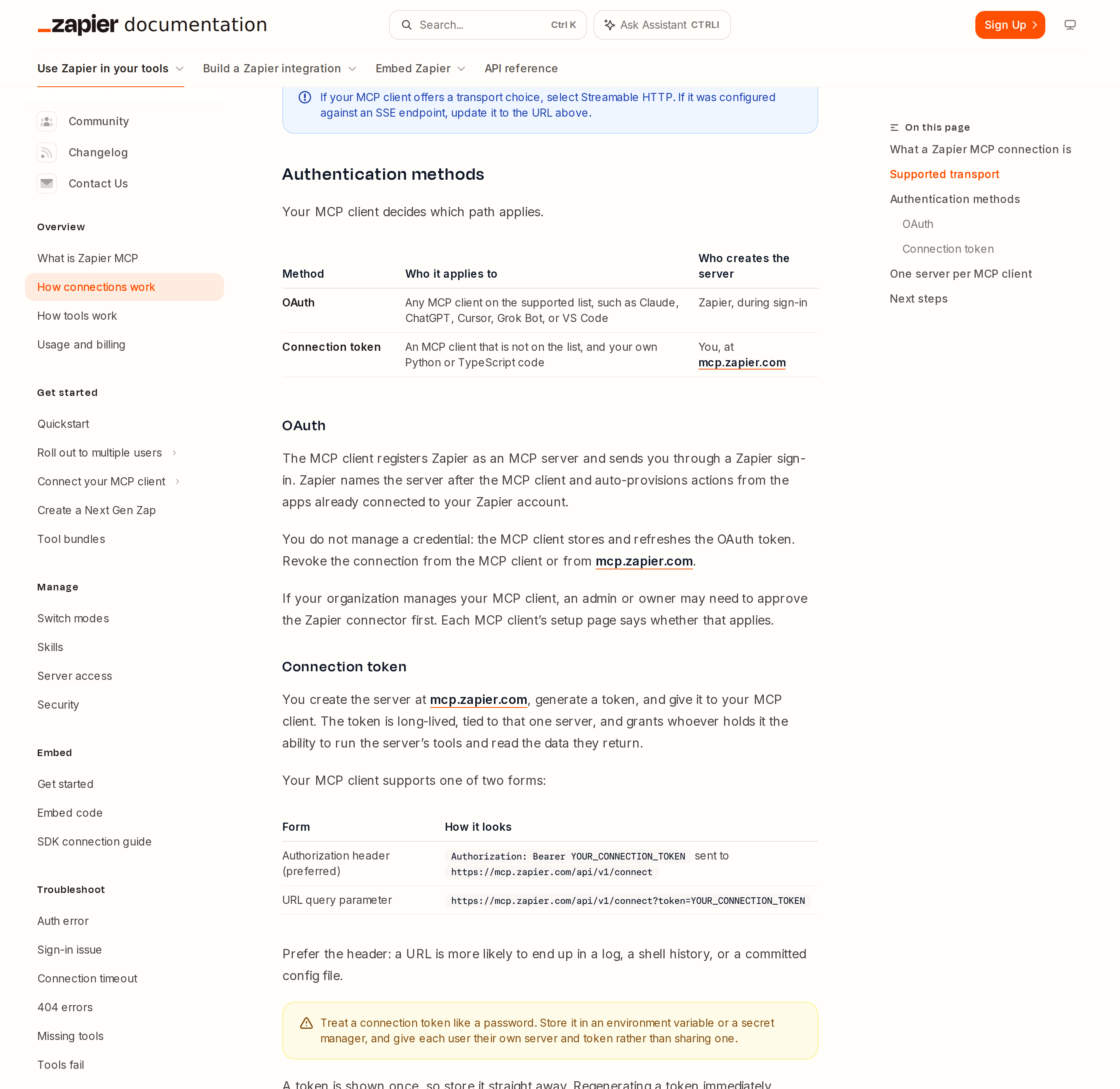
The connection model in one page: one shared endpoint, Streamable HTTP only, and a clean split between interactive OAuth and a long-lived connection token.
The transport trap: Streamable HTTP only, no SSE
This is the single most common reason a Zapier MCP integration "does not work". Zapier MCP does not support Server-Sent Events (SSE). If your MCP client only speaks SSE, it cannot connect, full stop. If your client offers a transport choice, select Streamable HTTP. If it was configured against an old SSE URL, update it to https://mcp.zapier.com/api/v1/connect.
A lot of older MCP tutorials hand out /sse endpoint patterns as if they were interchangeable. With Zapier, that is a dead end, and the error surfaces as a connection failure rather than anything that names the transport.
One server per MCP client (and the Cursor / Grok exception)
Zapier's mental model is that each MCP client gets its own MCP server — one for Claude, one for ChatGPT, one for Cursor. You can create as many as you like, but only one per named MCP client. The lone exception: Cursor and Grok Bot share the same underlying connection, so connecting either uses the same server.
A server itself has no tool or call limit. The only ceiling is your Zapier plan's task allowance — covered below.
Agentic mode vs managed mode: the setting that changes your tool list
Zapier MCP servers run in one of two modes, and picking the wrong one is a common source of "why does my assistant have 200 tools?" confusion.
| Agentic mode (default) | Managed mode | |
|---|---|---|
| Tool selection | The agent discovers and enables tools during conversation | You pick the tools up front; the agent uses only those |
| What the client sees | 16 static meta-tools, regardless of connected apps | Every enabled action becomes its own dedicated tool |
| Skills | Available | Unavailable (not deleted — restored when you switch back) |
| Best for | Conversational assistants, exploratory work | Fixed, auditable, narrow tool surfaces |
New servers default to agentic mode; a small number of programmatic or non-conversational clients default to managed mode instead.
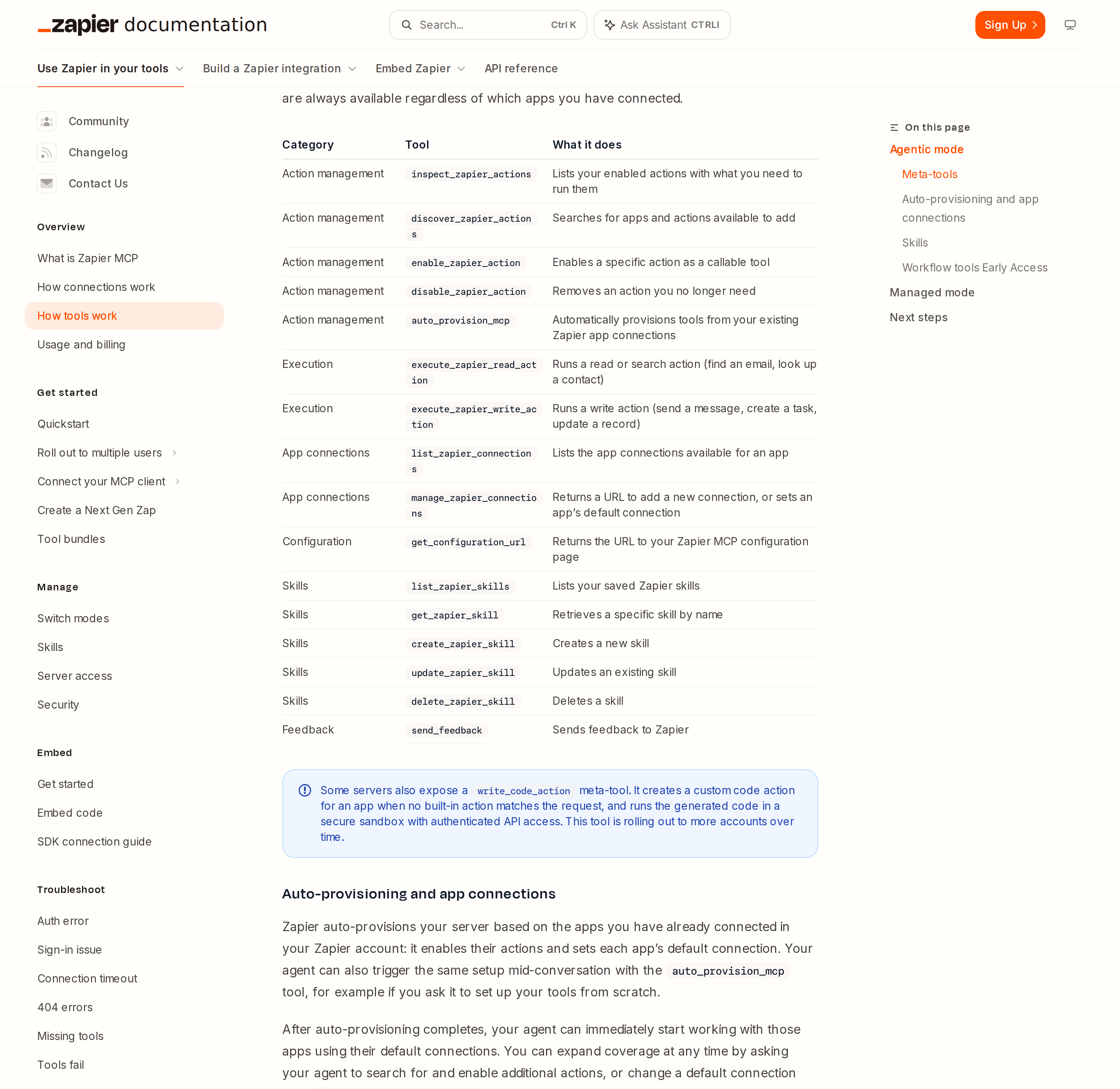
Agentic mode exposes 16 meta-tools and lets the agent discover actions on demand; managed mode trades that flexibility for an explicit, pre-approved tool list.
In agentic mode your server always exposes 16 static meta-tools across six categories. The ones you will actually see fire:
- Action management —
discover_zapier_actions(search for apps and actions),enable_zapier_action,disable_zapier_action,inspect_zapier_actions,auto_provision_mcp - Execution —
execute_zapier_read_action(find an email, look up a contact) andexecute_zapier_write_action(send a message, create a task, update a record) - App connections —
list_zapier_connections,manage_zapier_connections - Configuration —
get_configuration_url - Skills —
list_zapier_skills,get_zapier_skill,create_zapier_skill,update_zapier_skill,delete_zapier_skill - Feedback —
send_feedback
The read/write split inside execution is not cosmetic. It is the natural place to apply policy: allow execute_zapier_read_action everywhere and gate execute_zapier_write_action behind approval.
Skills are reusable Markdown workflow instructions your agent loads on demand — and the docs are explicit that skills are agentic-mode only. If you want a small, fixed, non-discoverable tool surface, you want managed mode; if you want the agent to build its own capabilities mid-conversation and reuse saved procedures, you want agentic mode.
Meta-tools are not the only layer: Next Gen Zaps (early access)
Zapier is also exposing workflow tools under early access, which turn MCP into a workflow builder: create_workflow, import_zap_to_workflow, update_workflow, create_workflow_draft, run_workflow_draft, publish_workflow_draft, run_workflow, list_workflows, and friends. Worth knowing about, but treat it as a preview surface rather than a foundation for production automation — the draft/publish model is deliberately gated and the tool set is still moving.
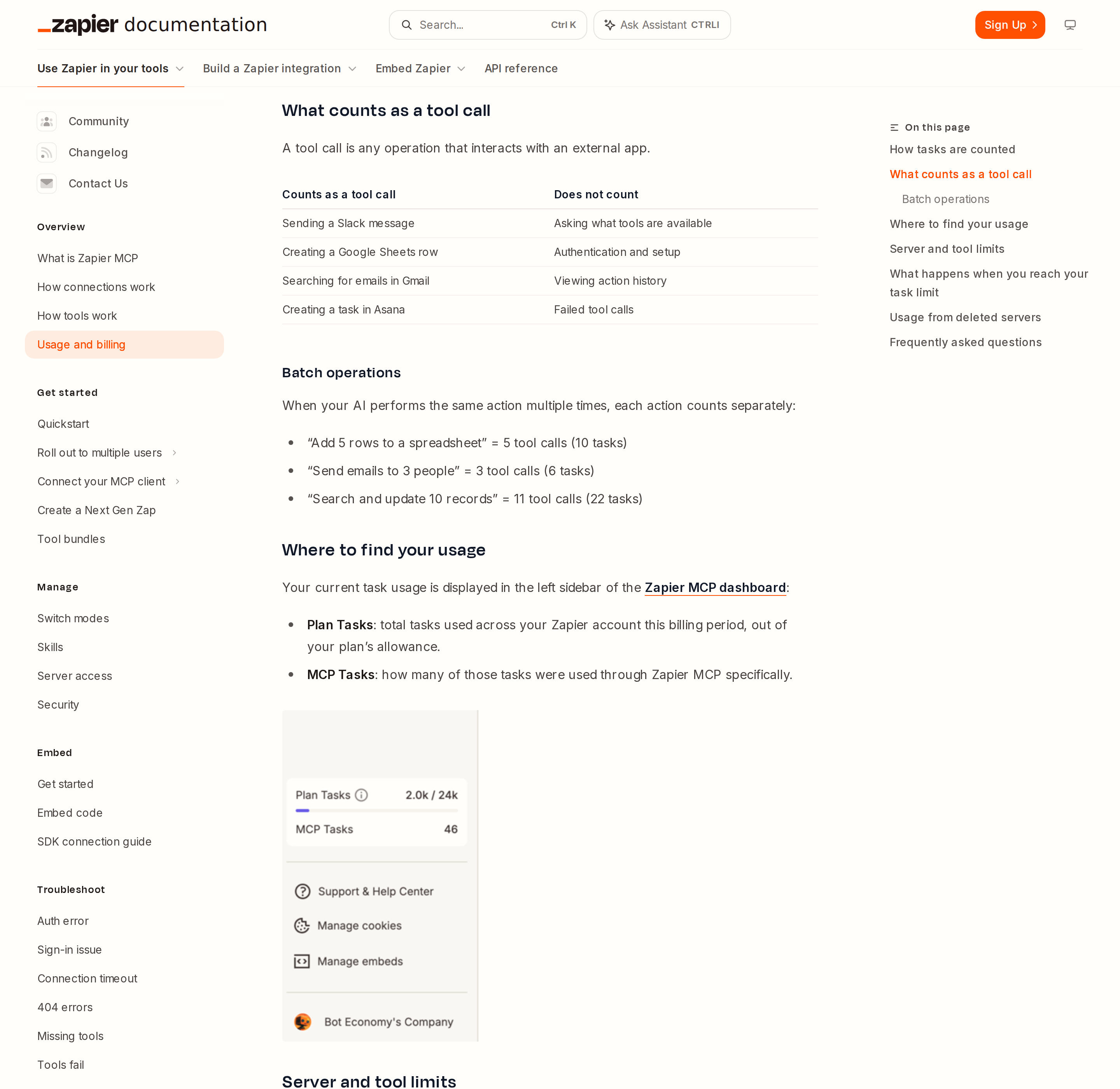
Every successful tool call costs two tasks; the dashboard splits total plan usage from MCP-specific usage so you can see where the burn is coming from.
Real Workflows: What Zapier MCP Is Actually Good For
Zapier is strongest when the action matters more than the data model. It is a superb executor across thousands of apps, and a mediocre system of record. Point it at tasks like these:
1. "Turn this conversation into a task somewhere"
You are discussing a bug in chat. Instead of context-switching to Jira, the assistant already has the whole conversation and creates a properly described issue — title, description, priority — in one step. This is Zapier's flag-plant idea: acting on something you are already discussing.
2. Cross-app round trips in one request
"Find the contact in HubSpot and email them the pricing doc." That is two tool calls against two different apps, coordinated by the model. Zapier's own example counting applies: each is a real call and each costs tasks.
3. One-off actions that do not deserve a Zap
Zapier MCP is explicitly positioned for requests you make once, in the moment — the thing you would otherwise open a browser tab and do by hand. Not everything needs to become an automation.
4. Giving a coding assistant hands
Cursor, VS Code, and similar clients can create issues, post updates, and check records without leaving the editor. This is where the managed-mode instinct kicks in: a coding agent does not need 9,000 apps of reach.
5. Fan-out operations, with the cost math understood
"Add 5 rows to a spreadsheet" is 5 tool calls (10 tasks). "Send emails to 3 people" is 3 tool calls (6 tasks). "Search and update 10 records" is 11 tool calls (22 tasks). Zapier MCP is honest that batch operations multiply — plan the fan-out before you launch it, not after.
Zapier's value proposition is breadth with governed credentials: you connect the apps once in Zapier, and every MCP client inherits the same connections.
Zapier-Specific Pitfalls (the ones that cost a support ticket)
- Task accounting is 2 tasks per successful call, and the whole account shares one pool. Zapier MCP runs on your existing plan with no separate MCP billing — every successful tool call consumes two tasks from the same allowance your Zaps use. Failed calls are free. There is no per-session call limit; the only ceiling is the shared task allowance, so a chatty agent can starve your production Zaps. The blast radius is backwards from what people assume: the automation layer is what breaks, not the assistant.
- When tasks run out, every tool call returns a task-limit error — and that is not a connection bug. If pay-per-task billing is on, calls keep working up to a cap and you get charged. If it is off, calls stop until the cycle resets or you upgrade. The server config and connected apps are untouched, so nothing needs reconfiguring once tasks return. Zapier's own diagnostic line is worth internalising: if tools are failing and you still have tasks left, the limit is not your problem.
- A connection token is a full-power credential. Whoever holds it can run that server's tools and read their output. Zapier says store it in an env var or secret manager, prefer the Authorization header over the query parameter, and give each user their own server and token rather than sharing. Regenerating revokes the old token instantly and breaks every client still using it — plan rotation.
- SSE clients simply cannot connect. Streamable HTTP is the only supported transport. Old configs pointing at SSE endpoints need to be rewritten, not retried.
- Agentic mode's auto-provisioning only covers your own app connections. Connections shared with you by another Zapier user are not included in auto-provisioning. If a teammate shared a Slack or database connection with you, do not expect it to appear as a tool.
- An empty account provisions an empty server — and that is a feature, not a failure. If your Zapier account has no app connections yet, auto-provisioning has nothing to enable and the server starts empty. Your agent still works: it discovers an action, enables it, and prompts you to connect the app the first time it needs one.
- Switching modes leaves your client holding a stale tool list. Going agentic → managed makes skills and code actions unavailable and turns every action into its own tool, so the client suddenly shows many more tools. Going managed → agentic restores meta-tools and dynamic discovery. In both directions, most clients cache the tool list — ChatGPT needs a Refresh under Connector Settings, Claude Desktop needs a restart, and Cursor/VS Code need a window reload. Skip that step and the agent works from a list that no longer exists.
- One server per named client, and admin approval can block the connector entirely. If your organization manages your MCP client, an admin or owner may have to approve the Zapier connector before members can add it. An admin never distributes a connection token — members sign in once. Zapier MCP is enabled by default on Enterprise accounts, and disabling it requires contacting an account manager.
- Deleted servers delete their logs; consumed tasks still count. When you delete an MCP server, all its logs go with it. Tasks that server already burned still count toward the billing period. If you need the history, export before deleting.
- Test calls count. Including your own tests. Budget them.
Zapier MCP vs. n8n MCP vs. Make MCP: Which Layer Owns the Logic?
This is the decision that actually matters, and it is architectural rather than cosmetic:
- Zapier MCP is a hosted endpoint you connect to. Zero infrastructure, thousands of pre-built actions, credentials and OAuth handled for you, governed by workspace controls and audit history. You do not own the execution layer, and every call costs tasks.
- n8n MCP is infrastructure you run. You build the server yourself inside a workflow, own the credentials and the execution layer, and can additionally run n8n as an MCP client. More control, materially more work — see our n8n MCP guide.
- Make MCP is also a hosted surface, with its own scenario model and pricing — covered in our Make MCP guide.
The honest rule of thumb: if you want the assistant to act across many SaaS apps today with the least setup, Zapier MCP is the fastest route; if the automation logic itself is your asset, n8n is the only one of the three where you own it. For a Zapier-centric team, the companion pages are How to Connect Zapier to OpenClaw, Zapier with ChatGPT, and OpenClaw for Zapier.
Cody sits on top of this rather than competing with it: connect your tools once from the Cody dashboard and reach them from Slack, Telegram, or web chat — the assistant experience layered over the automation layer, without hand-building a Slack-facing control surface. See HubSpot MCP for another example of the same pattern.
How to Connect Zapier via MCP
There are two main paths:
Option A: Use Zapier's official MCP server
Zapier maintains an official Zapier MCP server. This is the recommended starting point — it's built and maintained by the Zapier team, so it stays up to date with API changes.
Note: Remote MCP server — no self-hosting. Gives AI direct access to any app in Zapier's library.
What the server exposes:
- 8,000+ app actions
- trigger Zaps
- run Zap steps
- automated workflows
What you'll need:
- An MCP-compatible client (Claude Desktop, OpenClaw, or another host)
- Zapier credentials configured per the server's setup guide
This path gives you the most control but requires you to handle client configuration and credential management yourself.
Option B: Use Cody (OpenClaw-based, managed)
Cody is built on OpenClaw and supports MCP-compatible integrations out of the box. You connect Zapier once from the Cody dashboard — no server to run, no code to write — and Cody handles authentication, context passing, and write-back actions with appropriate guardrails.
Cody works where your team already operates: Slack, Telegram, or the web chat. The Zapier connection is available to your entire team without each person setting up their own MCP client.
Want Zapier Connected to AI Without Running Your Own MCP Server?
Cody gives your team a Zapier AI assistant in Slack, so people can inspect Zaps, explain workflow ownership, triage task failures, and trigger approved automations without living inside Zap editors, folders, and task history all day.
MCP vs Other AI Integration Patterns
| Approach | What it is | Tradeoff |
|---|---|---|
| MCP | Standardised protocol for live tool access | Requires an MCP server; most powerful when set up correctly |
| RAG (retrieval) | Pre-index Zapier content and retrieve it | Good for static docs; not suitable for live/transactional data |
| Manual copy-paste | Paste Zapier output into ChatGPT/Claude | Fast to start; breaks for anything recurring or at scale |
| Custom API wrappers | Bespoke integration code per tool | Full control; high maintenance overhead |
MCP wins when you need live data from Zapier and want to avoid rebuilding integrations as APIs change.
Common Mistakes
- Using training data when live data is needed — if the AI doesn't have an MCP connection, it will answer from memory, which is often outdated or wrong for account-specific questions
- No write-back guardrails — MCP can write to Zapier, so it's worth adding an approval step for any action that modifies records
- Too many tools exposed at once — give the AI access to the Zapier actions it actually needs; a scoped connection is easier to reason about and audit
- Skipping structured outputs — ask the AI to return structured JSON or clear fields when writing back to Zapier; free-form output is harder to validate
Related MCP Guides
Want the full workflow picture? See: Zapier AI Automation and How to Connect Zapier to OpenClaw.