If you're searching for "Notion MCP", you're asking one of two things: does Notion have an MCP server? or how do I connect Notion to an AI assistant via the Model Context Protocol?
✅ Notion has an official MCP server. Details in the setup section below.
What Is MCP?
Model Context Protocol (MCP) is an open standard developed by Anthropic that lets AI assistants — like Claude — connect to external tools, APIs, and data sources in a standardised way.
Before MCP, every AI integration required bespoke tooling: custom prompts, custom API wrappers, and custom glue code to pass context back and forth. MCP replaces that with a common interface: the AI asks the MCP server for data or actions, the server returns structured results, and the AI uses them to answer your question or complete a task.
In plain terms: MCP is how you give an AI assistant live access to Notion — not just knowledge about it, but real, up-to-date data from your account.
What a Notion MCP Integration Does
Once Notion is connected via MCP, your AI assistant can:
- Read live data — pull records, metrics, activity, and status directly from Notion
- Take actions — create, update, or log records based on your instructions
- Cross-reference context — combine Notion data with other connected tools mid-conversation
The key difference from a standard chatbot: the assistant is not working from training data or memory. It is reading your actual Notion instance, in real time.
Practical Notion MCP Use Cases
Query issues and PRs without leaving chat
Ask the assistant to list open issues by label, summarise a PR, or find tickets assigned to a specific person — it queries Notion directly and returns the result.
Write tickets from conversation
Turn a Slack message or call note into a properly structured ticket in Notion: title, description, acceptance criteria, and priority — without touching the UI.
On-call context lookup
During an incident, have the assistant pull recent deployments, open issues, and related PRs from Notion to help narrow down root cause faster.
Release note generation
At the end of a sprint, ask the assistant to fetch merged PRs from Notion and produce user-facing release notes grouped by theme.
Notion MCP: The Official Hosted Server, Explained Properly
Notion ships an official, first-party MCP server hosted by Notion itself — not a community wrapper. It runs at:
https://mcp.notion.com/mcp
This matters because the two most common pieces of "Notion MCP" advice you will find online point at the wrong thing. The old makenotion/notion-mcp-server package is a community-maintained open-source server, and Notion's own docs now carry an explicit warning: the open-source package is no longer actively maintained. The recommended path for almost everyone is the remote server, which requires no infrastructure and receives current tools and updates automatically.
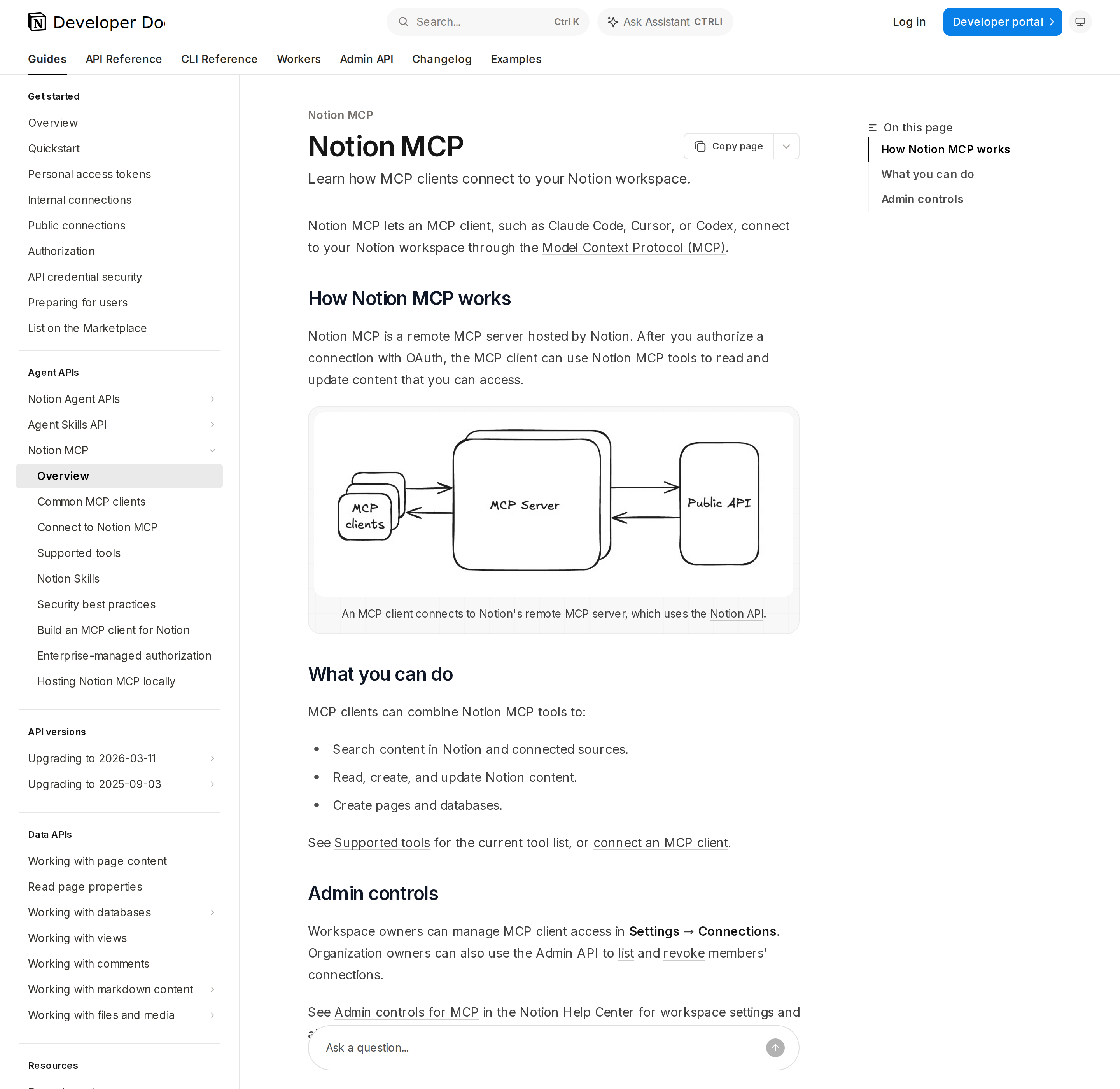
Notion's official MCP overview: a remote server that a client reaches over OAuth.
Two transports, one server
| Transport | URL | When to use |
|---|---|---|
| Streamable HTTP (recommended) | https://mcp.notion.com/mcp |
Every new client |
| Server-Sent Events (SSE) | https://mcp.notion.com/sse |
Only clients that cannot do Streamable HTTP |
Both endpoints speak the same MCP protocol and accept the same OAuth tokens. Try Streamable HTTP first and fall back to SSE only if your client demands it — SSE is legacy and will not be where new features land.
Connecting the common clients
Each client has its own one-liner. These are the exact commands from Notion's docs:
Codex (ChatGPT) — add the server to ~/.codex/config.toml:
[mcp_servers.notion]
url = "https://mcp.notion.com/mcp"
then authenticate with codex mcp login notion.
Claude Code — one command, then /mcp to finish OAuth:
claude mcp add --transport http notion https://mcp.notion.com/mcp
Use --scope user to make it available across all projects, or --scope project to share it with your team via .mcp.json. Notion also publishes a Claude Code plugin that bundles the server, Skills, and slash commands.
Cursor — create .cursor/mcp.json:
{
  "mcpServers": {
    "notion": {
      "url": "https://mcp.notion.com/mcp"
    }
  }
}
then enable Notion under Customize in the sidebar and complete the OAuth flow.
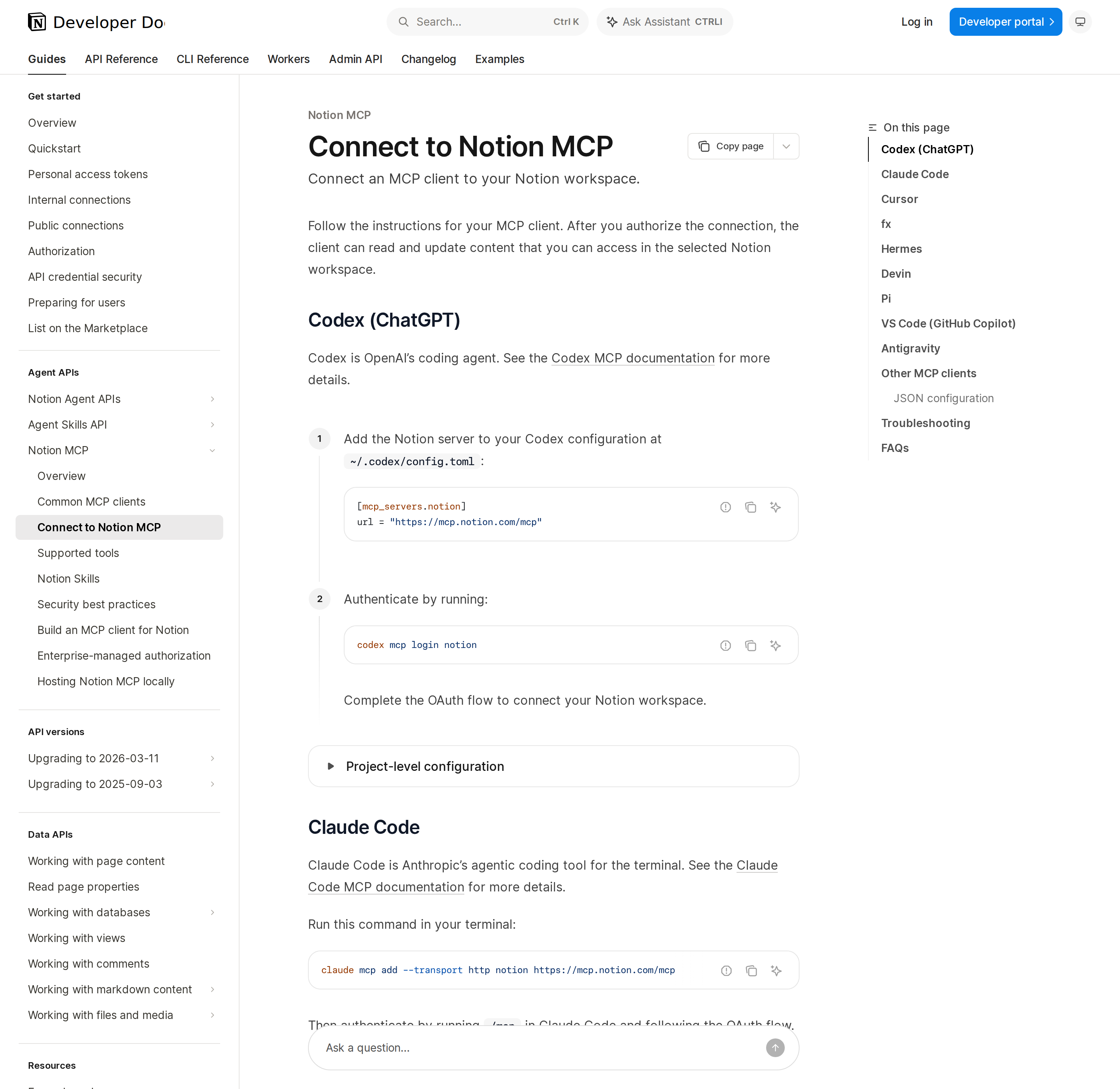
Notion documents setup per client rather than one generic config, because each client stores its MCP config differently.
What the tools actually do
The tool surface is broader than "search and read." The ones that matter in practice:
| Tool | What it is for |
|---|---|
notion-search |
The single content-search tool. On a plan with Notion AI it runs AI search across Notion plus connected sources (Slack, Mail, Calendar, Google Drive, Jira); otherwise it falls back to keyword search. |
notion-fetch |
Reads a page, database, data source, or saved view by URL or ID — including its schema and available templates. |
notion-create-pages / notion-update-page |
Creates and edits pages with markdown content, properties, icons, covers, and database templates. |
notion-query-data-sources |
Queries data sources with SQL, reads rows, or runs a saved view. |
notion-query-meeting-notes |
Queries your meeting notes by title keyword — meetings you attended or created. |
notion-get-tool-access |
Reports which tools your workspace's plan allows and which parameters are restricted. |
notion-get-self |
Returns the connected workspace and user. |
notion-download-skill |
Downloads a Notion Skill (a page of reusable instructions) as a tar.gz with SKILL.md. |
That last pair — Skills and Custom Agent sessions — is where Notion's MCP surface goes beyond most competitors. A Skill is just a page you own whose instructions a client can fetch and follow; a client with the right tools can start, message, and stop Notion Custom Agent sessions.
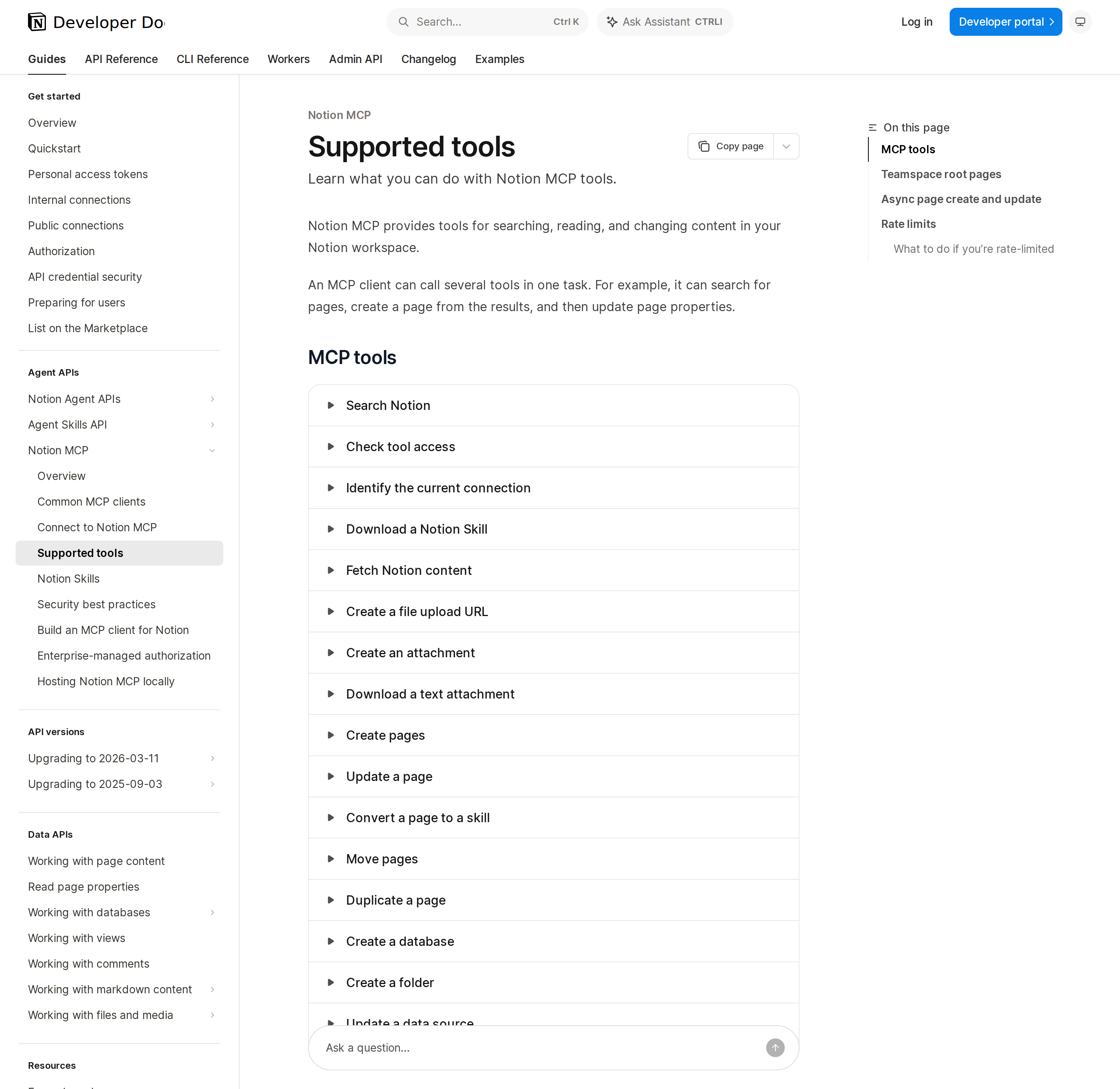
Notion's Supported Tools reference. Tools enforce their own plan limits at call time, so you do not need to check first.
The plan and permission model you have to understand
Notion MCP is not "connect and get everything." Three layers gate what actually comes back:
- Your access is the ceiling. A connected client can reach content that you can access — nothing wider. There is no service-account superpower here.
- Plan gates specific parameters. Full search — filtering by editor, last-edited date, multiple teamspaces, title-only, or content status, and sorting by date — needs Business or Enterprise with Notion AI. On lower plans those options are quietly dropped and reported in a
noticesarray, not failed. This is the signature silent-degradation behaviour of Notion MCP: you ask for a filtered search, you get a broader one, and the only clue is a notice field most clients never surface. - Admin controls can block it entirely. Workspace owners manage MCP client access in Settings → Connections; org owners can list and revoke members' connections through the Admin API.
Two more sharp edges worth knowing before you ship anything autonomous:
- Signed media URLs expire fast. Cover and icon URLs returned by
notion-fetchare valid for five minutes (the REST API uses one hour). A client that caches a page render and tries to reuse the image URL a few minutes later gets a broken image — re-fetch the page to get a fresh URL. - Large pages truncate. When a page is too big to load in full, the response sets
truncated: trueand returns up to 50 omitted subtree root IDs inunknown_block_ids. Anobject_not_foundwhen you retry one of those IDs is usually a permissions signal, not a bug — it may be content you simply cannot read.
When to self-host instead
There is exactly one common reason to run the open-source notion-mcp-server locally: you need bearer-token authentication for fully automated workflows where an interactive OAuth browser round-trip is impossible. The official docs list the other legitimate cases — reusing an existing Notion connection, needing the original JSON-based v1 APIs, or wanting to manage the infrastructure yourself.
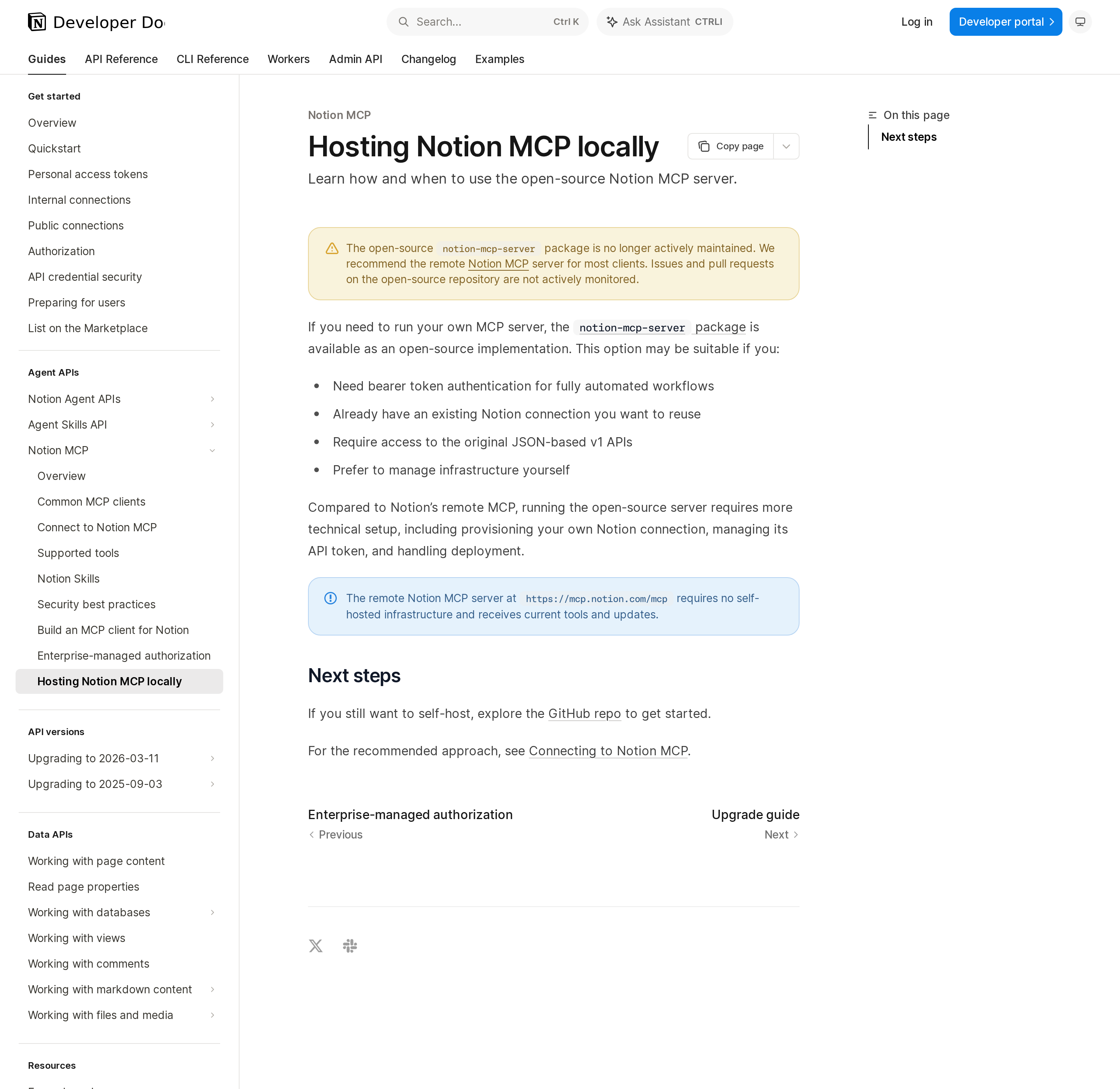
Notion's self-hosting page leads with a maintenance warning — the remote server is the recommended default.
For scheduled jobs and CI, the official enterprise path is better than self-hosting: enterprise-managed authorization lets your identity provider mint a short-lived ID-JAG that a client trades for a Notion MCP access token with no browser and no consent screen. It requires the Enterprise plan with SAML SSO configured, and each token is short-lived (default 8 hours, no refresh token — you fetch a new ID-JAG and exchange it again).
Concrete workflows worth wiring up
- "What did we decide about the mobile launch?" —
notion-searchruns across Notion and connected Slack/Mail/Drive/Jira on a Notion-AI plan, so one question reaches decisions that live in a meeting note, a Slack thread, and a Drive doc. - Weekly sprint rollup without opening the tracker —
notion-query-data-sourcesinrowsmode over a tasks data source, filter by status, sort by priority. - Meeting-notes to action items —
notion-query-meeting-notesfiltered by title keyword, thennotion-create-pagesto drop the action items into a project board. - Doc review in the terminal —
notion-fetcha spec page in Claude Code or Cursor, edit the surrounding repo, andnotion-update-pageto push edits back.
Pitfalls specific to Notion MCP
- Silent filter-dropping. Restricted search filters and sorts do not error — they are removed and reported in
notices. If you depend on a filter, read the notice array before trusting the result set. notion-searchis really two tools under one name. The same tool runs AI search or keyword search depending on the workspace's plan and admin/billing state, and the description changes with it. A prompt tuned on a Notion-AI workspace behaves differently on a workspace without it.- Fetch before you trust a search hit. AI-search results omit
verification; if a page's verified state matters, you mustnotion-fetchit. Connected-app results cannot be fetched at all. - Short-lived signed URLs. Five-minute cover and icon URLs break naive caching — re-fetch rather than persisting the URL.
update_contentis batch and all-or-nothing per call. If anyold_strfails to match, the whole update is rejected and the page is left unchanged. Usereplace_all_matches: truedeliberately, since a non-uniqueold_strotherwise errors.- Warnings are not failures but they are not nothing. Updates can return a
warningsarray (dropped lines, auto-corrected text) while still reporting success. Read it before treating the edit as done. - Prompt injection is the documented risk. Notion's own security page tells you to treat tool-returned content as untrusted and to enable confirmation before content-changing actions — a malicious instruction sitting in a page your client reads is the attack.
- SQL output can drop rich text. Mentions, link targets, and formatting may be missing from SQL results; that is not corruption. Read the property with rows mode or
notion-fetchbefore editing it.
For the connection path itself — as opposed to the MCP tool surface — see our guide to connecting Notion to OpenClaw, the Notion + ChatGPT walkthrough, and the OpenClaw-for-Notion overview.
How to Connect Notion via MCP
There are two main paths:
Option A: Use Notion's official MCP server
Notion maintains an official Notion MCP server. This is the recommended starting point — it's built and maintained by the Notion team, so it stays up to date with API changes.
Note: Official hosted, first-party remote MCP server over OAuth (Streamable HTTP at https://mcp.notion.com/mcp, SSE at https://mcp.notion.com/sse). The open-source makenotion/notion-mcp-server package still exists but is no longer actively maintained; Notion recommends the remote server for most clients. For non-interactive automation, enterprise-managed authorization (Enterprise + SAML SSO) mints a short-lived ID-JAG instead of a browser OAuth flow.
What the server exposes:
- pages
- databases
- data-sources
- views
- comments
- blocks
- search
- users
- meeting-notes
- skills
- custom-agent-sessions
What you'll need:
- An MCP-compatible client (Claude Desktop, OpenClaw, or another host)
- Notion credentials configured per the server's setup guide
This path gives you the most control but requires you to handle client configuration and credential management yourself.
Option B: Use Cody (OpenClaw-based, managed)
Cody is built on OpenClaw and supports MCP-compatible integrations out of the box. You connect Notion once from the Cody dashboard — no server to run, no code to write — and Cody handles authentication, context passing, and write-back actions with appropriate guardrails.
Cody works where your team already operates: Slack, Telegram, or the web chat. The Notion connection is available to your entire team without each person setting up their own MCP client.
Want Notion Connected to AI Without Running Your Own MCP Server?
Cody gives your team a Notion AI assistant in Slack, so people can search docs, summarise meeting notes, review database context, and turn workspace knowledge into clear answers and updates without hunting through Notion.
MCP vs Other AI Integration Patterns
| Approach | What it is | Tradeoff |
|---|---|---|
| MCP | Standardised protocol for live tool access | Requires an MCP server; most powerful when set up correctly |
| RAG (retrieval) | Pre-index Notion content and retrieve it | Good for static docs; not suitable for live/transactional data |
| Manual copy-paste | Paste Notion output into ChatGPT/Claude | Fast to start; breaks for anything recurring or at scale |
| Custom API wrappers | Bespoke integration code per tool | Full control; high maintenance overhead |
MCP wins when you need live data from Notion and want to avoid rebuilding integrations as APIs change.
Common Mistakes
- Using training data when live data is needed — if the AI doesn't have an MCP connection, it will answer from memory, which is often outdated or wrong for account-specific questions
- No write-back guardrails — MCP can write to Notion, so it's worth adding an approval step for any action that modifies records
- Too many tools exposed at once — give the AI access to the Notion actions it actually needs; a scoped connection is easier to reason about and audit
- Skipping structured outputs — ask the AI to return structured JSON or clear fields when writing back to Notion; free-form output is harder to validate
Choosing your Notion MCP path
| Situation | Use |
|---|---|
| Interactive use in Claude Code, Cursor, Codex, VS Code | Remote server at https://mcp.notion.com/mcp |
| Need bearer-token auth for a fully automated workflow | Open-source notion-mcp-server, self-hosted (mind the maintenance warning) |
| Enterprise, SAML SSO, no browser available | Enterprise-managed authorization via ID-JAG |
| Client cannot do Streamable HTTP | SSE at https://mcp.notion.com/sse |
The default answer is the remote server. Only reach for self-hosting when a concrete constraint — usually non-interactive authentication — forces it.
Related MCP Guides
Want the full workflow picture? See: Notion AI Automation and How to Connect Notion to OpenClaw.