Tools
Enrichments
Hand your agent a list of companies or people and get it back with the columns you were missing: what each company does, how big it is, whether it fits your ideal customer, and even a personalised first line for your email. It does in minutes the research that would take someone days.
Open in your dashboard →What people use it for
Sales
Turn raw lists into a qualified pipeline
Drop in thousands of company names from an event, a directory or a CRM export. The agent finds every website, industry and headcount, scores each one against your ideal customer, and hands your reps only the accounts worth calling.
Thousands of accounts researched overnight
Marketing
Personalise every email in a campaign
For each of your contacts, the agent reads the company’s website and writes an opening line about something specific to them. A 5,000-contact campaign where every email reads like it was written by hand.
One-to-one copy for the whole list
Investors
Screen your entire deal flow
Run every application or sourced startup through the same criteria: what they sell, who buys it, B2B or B2C, stage and fit score. Partners open the shortlist instead of the inbox.
Every deal scored the same way, every week
E-commerce and retail
Map an entire market
Check hundreds of online shops, distributors or competitors at once: which categories they sell, whether they ship to your country, whether they have a pricing page. A market study in an afternoon.
Whole markets, not samples
How it works
An enrichment runs a recipe: a list of columns the agent fills in for every row of your spreadsheet, in order. Later columns can use the answers from earlier ones, so you can go from a company name to a full profile.
- 1
Describe the columns you want
Create a recipe in Tools → Enrichments, or tell your agent what you need and it builds the recipe for you. - 2
Send your list
Attach the spreadsheet in the chat and say which recipe to use. The Runs tab shows each column filling up live. - 3
Get the finished spreadsheet
The agent sends the list back with the new columns filled in, and points out the rows it couldn’t answer.
One row, step by step
Your list · webinar-attendees.csv
website3agent4Find the official website of {name}5, based in {city}. Return only the domain.
northwind-logistics.com- ⛩ only if website is not empty
segmenttyped agentRead {website}. Is this a small business, a mid-market company or an enterprise?
one of: smb · mid_market · enterprise
mid_market fittypedHow well does a {segment} logistics company fit our ideal customer?
score: no fit → weak → good → perfect
good fit- ⛩ only if fit is not “no fit”6
opening_linemodelWrite one friendly first line for a cold email to {name} in {city}. No greeting.
“Running freight out of Rotterdam at Northwind’s scale…”
Enriched list · webinar-attendees-enriched.csv7
| name | city | website | segment | fit | opening_line |
|---|---|---|---|---|---|
| Northwind Logistics | Rotterdam | northwind-logistics.com | mid_market | good fit | “Running freight out of Rotterdam at Northwind’s scale…” |
- 1
Input row
One row of your spreadsheet, with the columns it already has. The recipe reads them but never changes them. - 2
Recipe
The reusable list of columns. Save it once and use it for every new list. - 3
Column
Each step becomes a new column in the finished file, with a short name likewebsiteand instructions in plain words. - 4
Type
How the column gets its answer. See the four column types below. - 5
{column} reference
A column name in curly brackets is replaced with that row’s value:{name}becomes “Northwind Logistics”. Use input columns or any earlier column. - 6
Gate
A condition that skips the column for rows that don’t need it. See Gates below. - 7
Enriched list
Your spreadsheet with every new column filled in, sent back in the chat.
Examples of what to ask

Cody
Online
I want a recipe for leads: find the company website, what they sell in one sentence, number of employees, and a yes/no on whether they sell software to other businesses.
Created the recipe “Lead qualification” with 4 columns: website → what they sell → employees → sells B2B software (yes/no). The last two only run when a website was found. Want me to try it on 5 rows first?
Cody
Online
Here’s webinar-attendees.csv. Run “Lead qualification” on it.
Done: 212 rows enriched in about 9 minutes. 64 companies sell B2B software, 131 don’t, and 17 had no website I could read (marked “unknown”). The enriched file is attached.
The four column types
The type decides how the agent answers a column. Pick a type to see what it does and an example. Rule of thumb: choose the simplest type that can answer the question, because it’s faster and cheaper.
Model model
An AI writes the answer using only the information already in the row and your instructions. It doesn’t search the web, so it’s fast and cheap.
- Goes online
- No, it only uses the row
- Answers with
- Free text
- Cost per row
Use it for
- Personalised first lines
- One-sentence summaries
- Translating or cleaning up text
- Rewriting in your tone
opening_linemodelInstructions
Write one friendly sentence for a cold email to {name} that mentions {what_they_sell}. No greeting, no emojis.
Row
Harbor Foods · sells frozen seafood to restaurants
Result
“Getting frozen seafood onto Dublin’s restaurant menus every morning is no small feat.”
Agent agent
A research assistant that searches the web and reads pages before it answers, a few searches per row. The most powerful type, and the most expensive.
- Goes online
- Yes, it searches the web and reads pages
- Answers with
- Free text
- Cost per row
Use it for
- Company websites
- Who the founder or CEO is
- LinkedIn profiles
- Headquarters, funding, recent news
decision_makeragentInstructions
Find the owner or CEO of {name} ({website}). Return only their full name, or leave it blank if you can’t confirm it.
Row
Casa Lumbre · casalumbre.es
Result
Lucía Herrera
Typed typed
A small decision model that must answer in a format you define: true/false, one of your options, or a score. Every row gets a comparable answer, and it doesn’t go online.
- Goes online
- No, it only uses the row (or the inputs you list)
- Answers with
- True/false, one of your options, or a score
- Cost per row
Use it for
- Qualifying leads
- Tagging industries
- Scoring fit
- Yes/no checks on data you already have
is_b2btypedanswer: true / false
Instructions
Does {what_they_sell} describe a product sold to other businesses?
Row
Harbor Foods · sells frozen seafood to restaurants
Result
true
Typed agent typed agent
Like Typed, but it first reads pages from a website you point it to (usually the company’s own), choosing which pages to open. If the site doesn’t say, it answers false or “unknown” instead of guessing.
- Goes online
- Yes, it reads the website you give it
- Answers with
- True/false, one of your options, or a score
- Cost per row
Use it for
- “Do they offer a free trial?”
- “Do they ship to Spain?”
- “Is there a pricing page?”
- “Which plan do they sell?”
free_trialtyped agentwebsite: {website} · up to 5 pages · answer: true / false
Instructions
Does this company offer a free trial?
Row
Lumen Studio · lumenstudio.io
Result
true
Answer formats and settings
Typed and typed agent columns answer in a fixed format you choose.
- answer: true / false
- The column is “true” or “false”. For typed columns you can set a threshold (0.5 by default): how sure the model must be before it answers true. Raise it to 0.7 or 0.8 when a wrong “true” is costly.
- answer: one of options
- The column is one of the options you list, one per line. Add a short description after a colon to explain when each applies: the clearer the descriptions, the better the answers.Examplec_level: CEO, CTO or founder manager: Head of or director ic: Individual contributor
- answer: score (levels)
- The column is one level of a scale you define, one per line, from lowest to highest.Exampleno fit weak fit good fit perfect fit
- inputs
- Which columns the model may look at, separated by commas. Leave it empty to use the whole row (typed) or only the website (typed agent).
- website and pagestyped agent only
- The site to read, usually
{website}, and the maximum number of pages to open per row (1 to 10). More pages can find buried answers but take longer and cost more.
Leave “model override” empty
Gates: run a column only when it makes sense
Every column has a gate, “always run” by default. Set a condition on an earlier column and the column is skipped (left empty) for rows that don’t match, so you don’t pay for research on rows you’ll discard anyway.
| Gate | Runs the column when the earlier column… | Example |
|---|---|---|
| always run | (no condition) | Every row |
| not empty | has any value | Find the CEO only if a website was found |
| equals / not equals | is (or isn’t) exactly a value | Only if is_b2b equals true |
| contains | includes some text | Only if category contains “restaurant” |
| matches /regex/ | matches a text pattern (advanced) | Only if email ends in a company domain |
| ≥ number / ≤ number | is at least / at most a number | Only if employees ≥ 20 |
Design and Runs tabs
- Who can use itWorkspace / Only me
- Workspace recipes can be used by everyone in the workspace and every agent. Personal recipes only by you.
- Design
- The recipe as a pipeline: the input row at the top and each column below it, with the references and gates that connect them.
- Runs
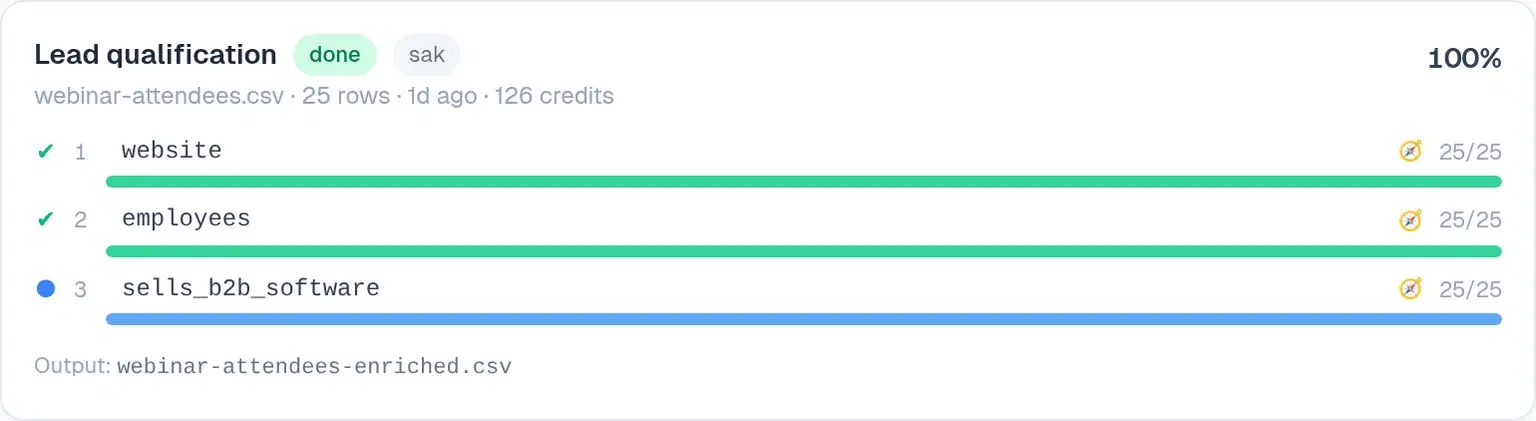
- Every time the recipe was used: the file, how many rows, when, the credits used, a progress bar per column and the output file. Live runs update on their own.
- Recent runs
- The same list for all recipes at once, newest first.
Frequently asked questions
+What kind of list can I enrich?
Any spreadsheet with one row per company, person or product: a CSV export from your CRM, a list of event attendees, a supplier list. Send it to your agent in the chat.
+Where does the information come from?
Research columns search the web and read public pages, such as the company’s own website. Writing and typed columns use only what is already in the row. Your list is used only to run the enrichment.
+How accurate is it?
Answers based on a company’s own website are usually reliable. When a column can’t find enough information it answers “unknown” or stays empty instead of guessing, so you can see which rows need a human look.
+How long does it take and what does it cost?
Rows run in parallel, so a few hundred rows usually take minutes. Each column on each row uses credits: typed columns a fraction of a credit, research columns a few credits. Every run shows its total in the Runs tab.